Accessing the On-Screen Keyboard (Windows)
1) Accessing the on-screen keyboard to take screenshots with Windows XP
Click on Start, go to All Programs, Accessories, Accessibility, and click on the "On-Screen Keyboard" program.
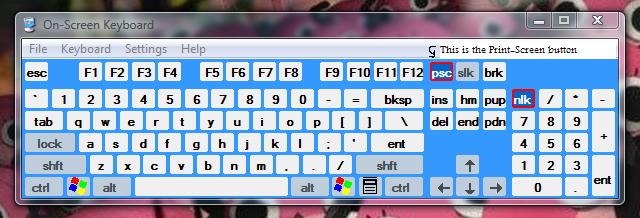
The on-screen keyboard should look like this:
2) Accessing the on-screen keyboard to take screenshots with Windows Vista
Click on Start, go to Control Panel, click on Ease of Access, and then click on Ease of Access Center.
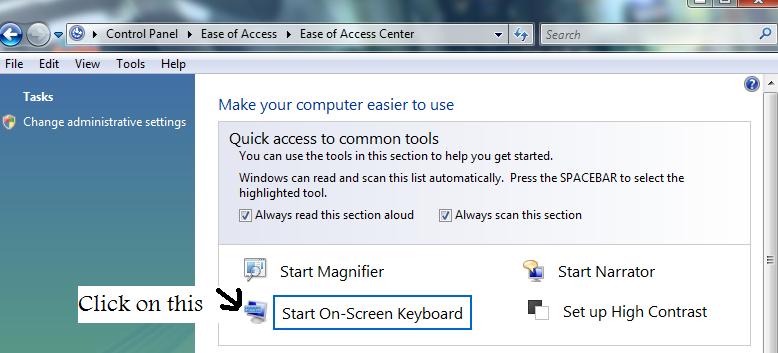
You should be here, and it should look like this:
Note: The on-screen keyboard should look the same as the Windows XP version.
Note: If you have a working physical keyboard, you can access the on-screen keyboard by clicking on Start, Run... (XP) / Start Search (Vista) and typing "OSK".
Click on Start, go to All Programs, Accessories, Accessibility, and click on the "On-Screen Keyboard" program.
The on-screen keyboard should look like this:
2) Accessing the on-screen keyboard to take screenshots with Windows Vista
Click on Start, go to Control Panel, click on Ease of Access, and then click on Ease of Access Center.
You should be here, and it should look like this:
Note: The on-screen keyboard should look the same as the Windows XP version.
Note: If you have a working physical keyboard, you can access the on-screen keyboard by clicking on Start, Run... (XP) / Start Search (Vista) and typing "OSK".