How to Find Your Own Topics
How To Find Topics by User Profile
Go to the user profile you wish to find topics in. If you are having trouble finding the users profile refer to this: How to Get a User's Profile Link
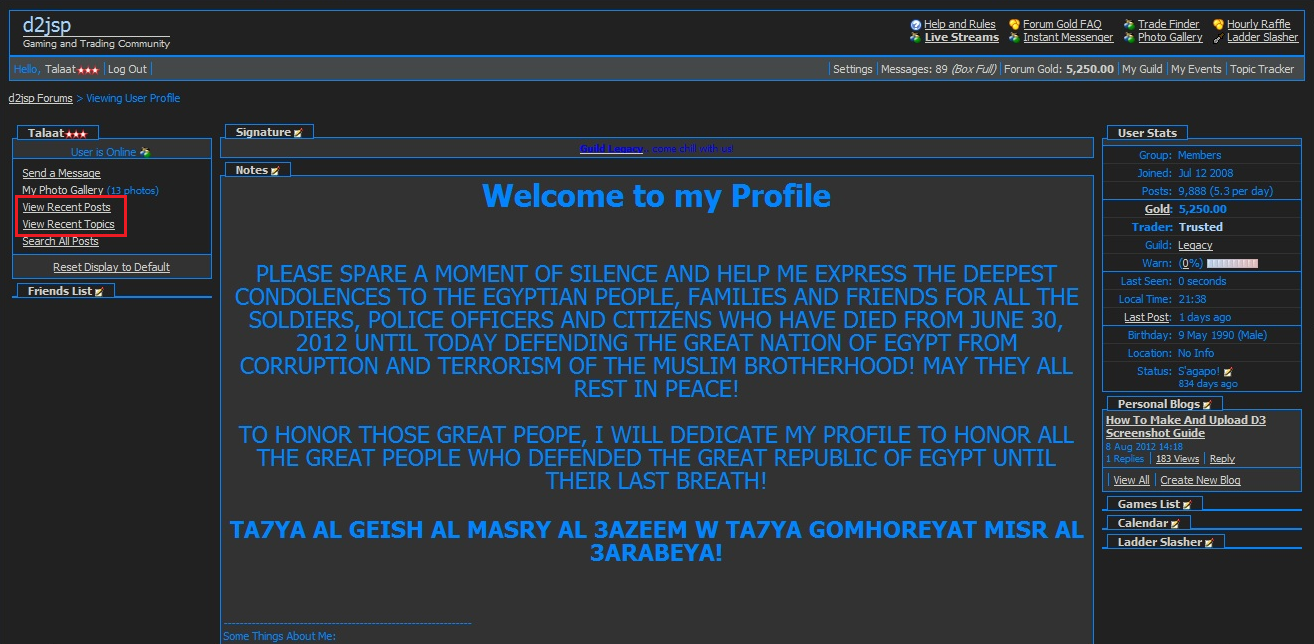
Click on the links highlighted for a complete posting history of the user from the last 30 days.
How To Find Topics in Opera
To skip the two steps below and move on to the second picture, press "Ctrl + Alt + H" on your keyboard.
1) Start by clicking on "Tools" when you have your browser open.
2) After that, choose "History".
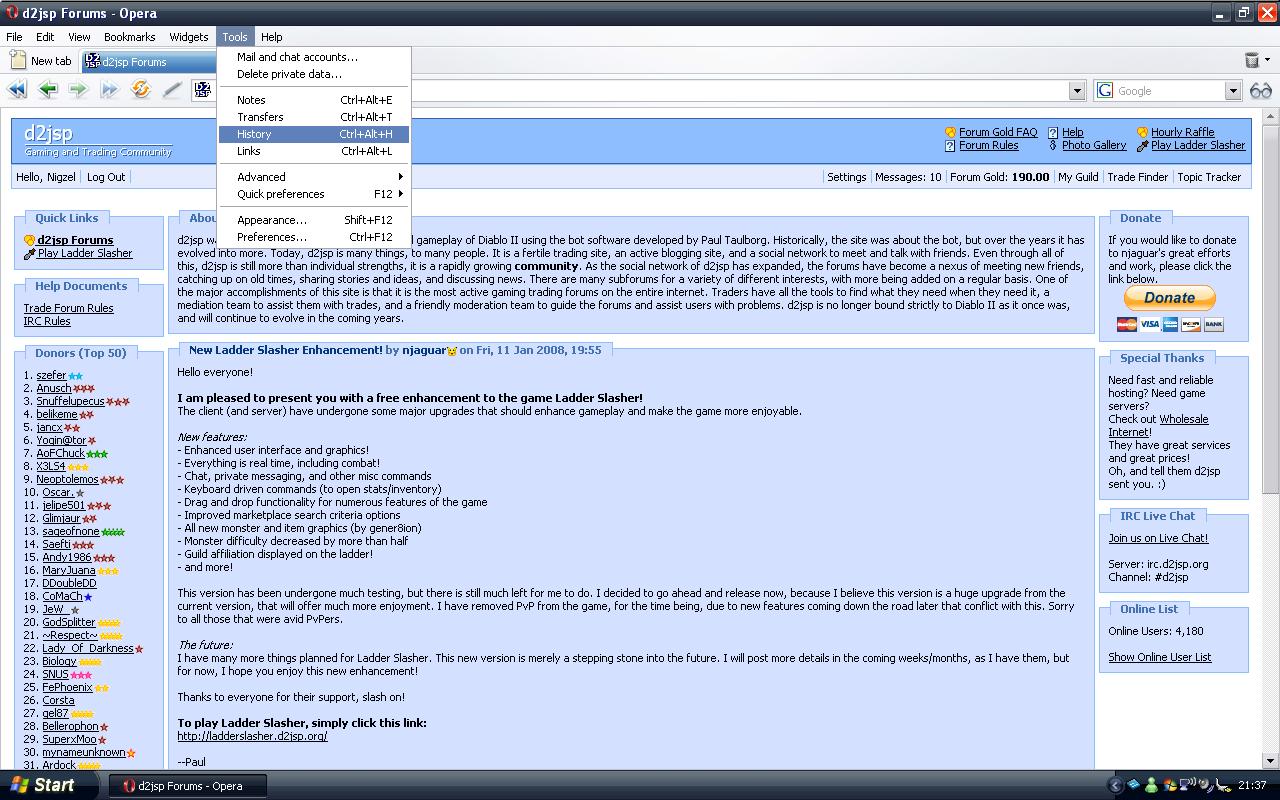
If you have done everything right, it should look like this: https://www.tcgn.org/upload/pics/196771331lom4.jpg
Now simply choose the day you visited the topic and look for it there.
How To Find Topics in Firefox
To skip the two steps below and move on to the second picture, press "Ctrl + H" on your keyboard.
1) Start by clicking on "History" when you have your browser open. You might see the topic-title here, if you do click it.
2) If you didn't saw the topic title there click "Show in Sidebar".
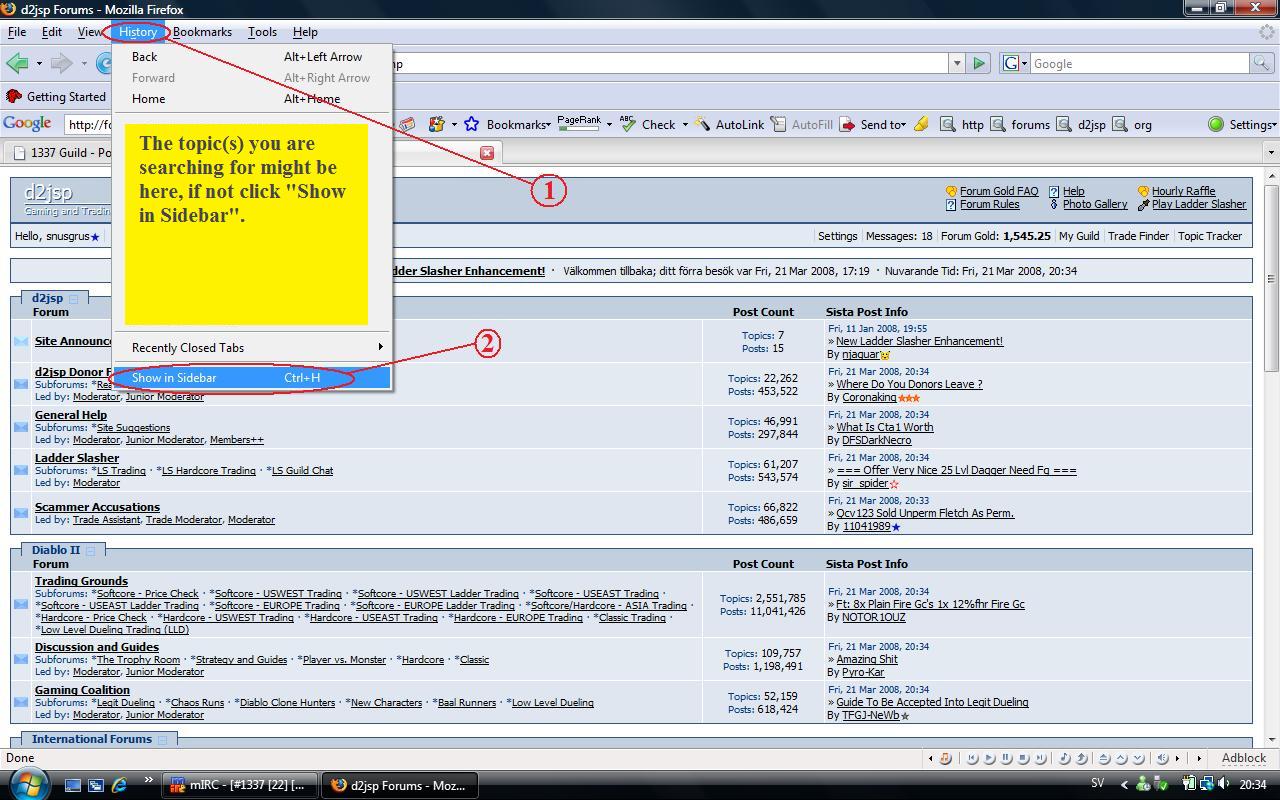
If you have done everything right, it should look like this: https://www.tcgn.org/upload/pics/19677145u56fv.jpg
Now simply choose the day you visited the topic and look for it there or search in the field if you know the topic title or part of it.
How To Find Topics in Internet Explorer
To skip the two steps below press "Ctrl + H" on your keyboard.
1) Start by clicking on the left star.
2) After that, choose "History".
If you have done everything right, it should look like this: https://www.tcgn.org/upload/pics/19677158ystxo.jpg
Now simply choose the day you visited the topic and look for it there.
How To Find Topics in Internet Explorer (old versions)
To skip the three steps below and move on to the second picture press "Ctrl + H" on your keyboard.
1) Start by clicking on "View" when you have your browser open.
2) After that, choose "Explorer Bar".
3) And finally click "History".
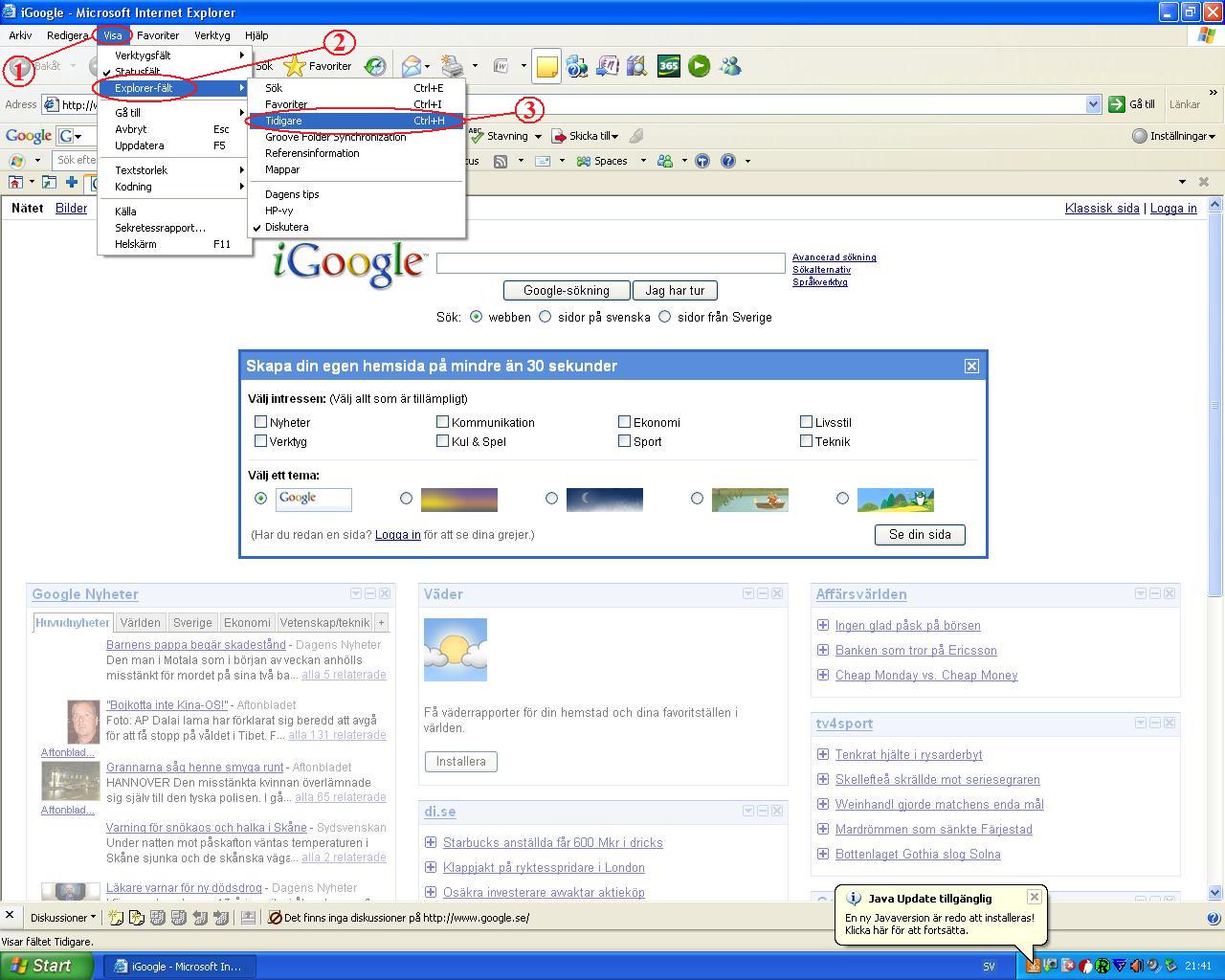
If you have done everything right, it should look like this: https://www.tcgn.org/upload/pics/19677187x66jc.jpg
Now simply choose the day you visited the topic and look for it there.
How To Find Topics in Safari
1) Start by clicking on "History" when you have your browser open. You might see the topic-title here, if you do click it.
2) If you didn't saw the topic title there click "Show All History".
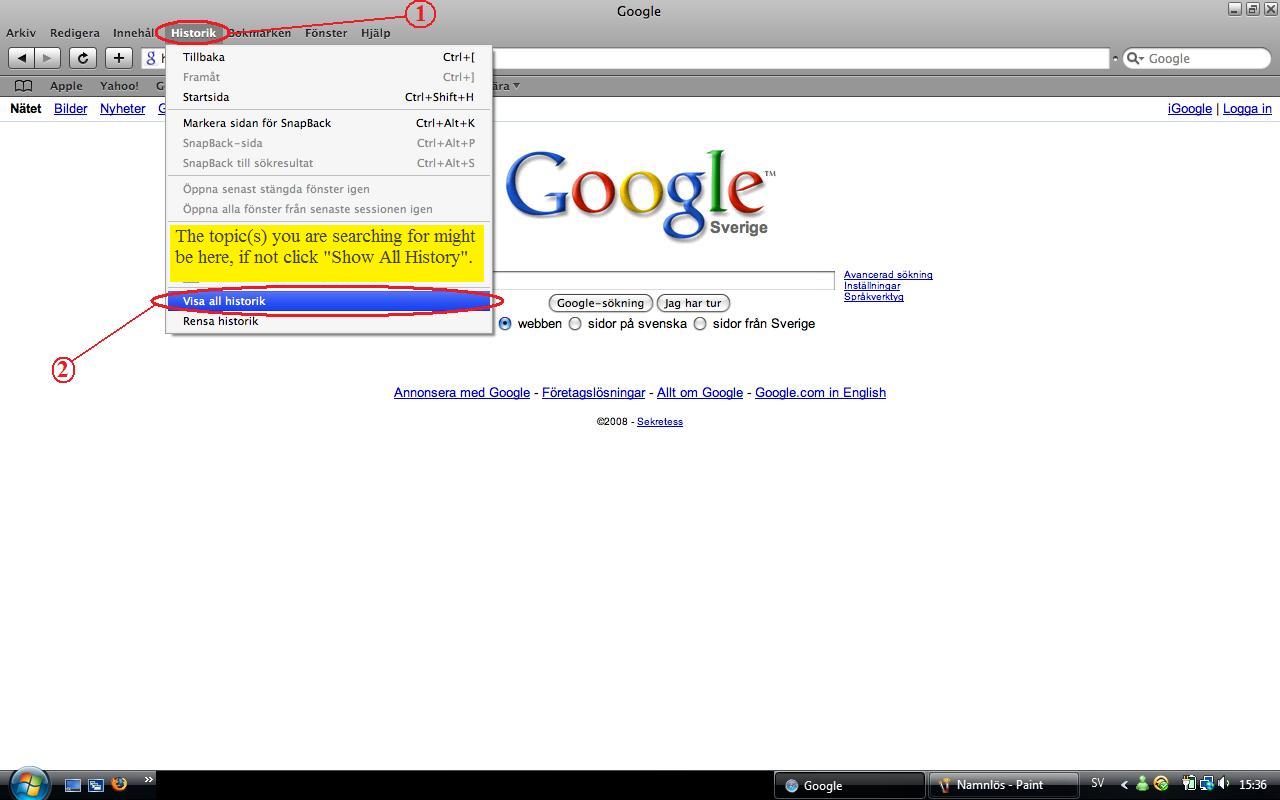
If you have done everything right, it should look like this: https://www.tcgn.org/upload/pics/19677201rjxzl.jpg
Now simply choose the day you visited the topic and look for it there or search in the field if you know the topic title or part of it.
How To Find Topics in Google Chrome
To skip the two steps below and move on to the second picture press "Ctrl + H" on your keyboard.
1) Start by clicking on the wrench symbol in the upper right corner.
2) After that, choose "History".
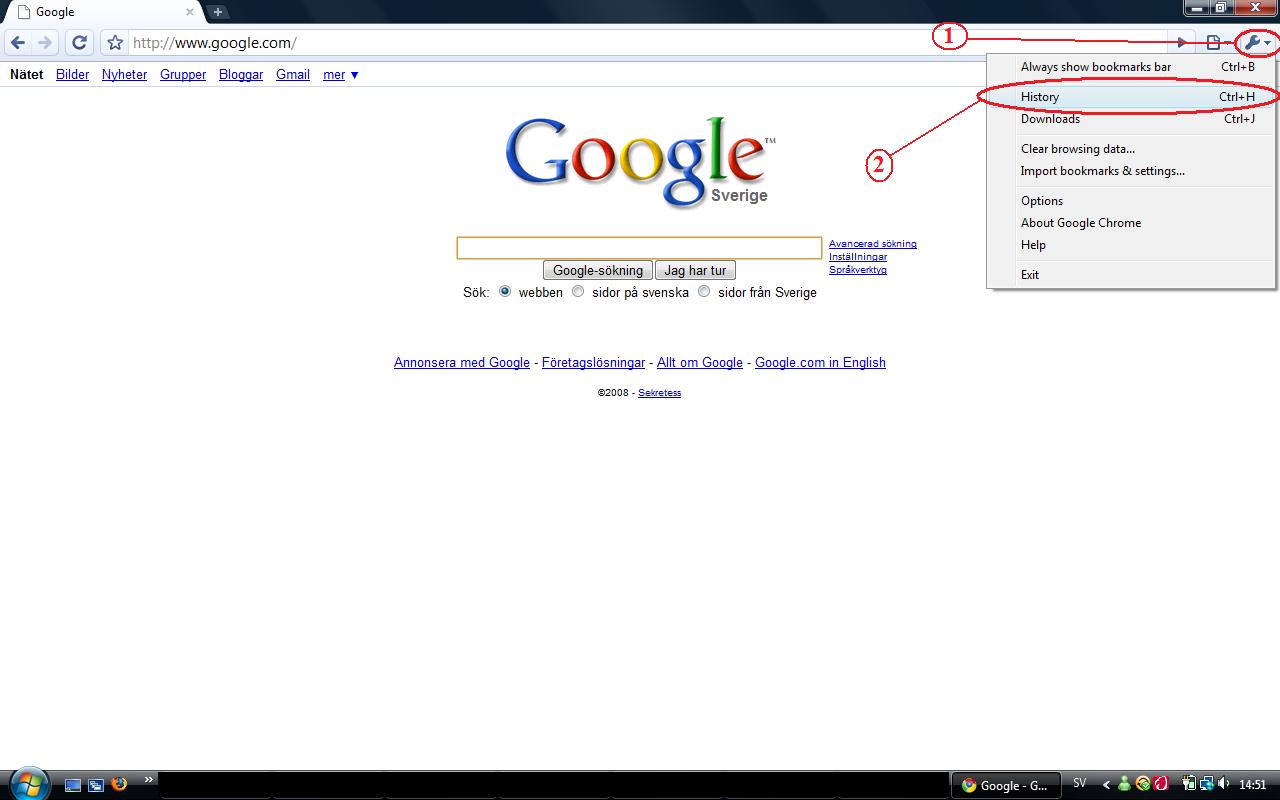
If you have done everything right, it should look like this: https://www.tcgn.org/upload/pics/18829894v2nas.jpg
Now simply choose the day you visited the topic and look for it there or search in the field if you know the topic title or part of it.
Go to the user profile you wish to find topics in. If you are having trouble finding the users profile refer to this: How to Get a User's Profile Link
Click on the links highlighted for a complete posting history of the user from the last 30 days.
How To Find Topics in Opera
To skip the two steps below and move on to the second picture, press "Ctrl + Alt + H" on your keyboard.
1) Start by clicking on "Tools" when you have your browser open.
2) After that, choose "History".
If you have done everything right, it should look like this: https://www.tcgn.org/upload/pics/196771331lom4.jpg
Now simply choose the day you visited the topic and look for it there.
How To Find Topics in Firefox
To skip the two steps below and move on to the second picture, press "Ctrl + H" on your keyboard.
1) Start by clicking on "History" when you have your browser open. You might see the topic-title here, if you do click it.
2) If you didn't saw the topic title there click "Show in Sidebar".
If you have done everything right, it should look like this: https://www.tcgn.org/upload/pics/19677145u56fv.jpg
Now simply choose the day you visited the topic and look for it there or search in the field if you know the topic title or part of it.
How To Find Topics in Internet Explorer
To skip the two steps below press "Ctrl + H" on your keyboard.
1) Start by clicking on the left star.
2) After that, choose "History".
If you have done everything right, it should look like this: https://www.tcgn.org/upload/pics/19677158ystxo.jpg
Now simply choose the day you visited the topic and look for it there.
How To Find Topics in Internet Explorer (old versions)
To skip the three steps below and move on to the second picture press "Ctrl + H" on your keyboard.
1) Start by clicking on "View" when you have your browser open.
2) After that, choose "Explorer Bar".
3) And finally click "History".
If you have done everything right, it should look like this: https://www.tcgn.org/upload/pics/19677187x66jc.jpg
Now simply choose the day you visited the topic and look for it there.
How To Find Topics in Safari
1) Start by clicking on "History" when you have your browser open. You might see the topic-title here, if you do click it.
2) If you didn't saw the topic title there click "Show All History".
If you have done everything right, it should look like this: https://www.tcgn.org/upload/pics/19677201rjxzl.jpg
Now simply choose the day you visited the topic and look for it there or search in the field if you know the topic title or part of it.
How To Find Topics in Google Chrome
To skip the two steps below and move on to the second picture press "Ctrl + H" on your keyboard.
1) Start by clicking on the wrench symbol in the upper right corner.
2) After that, choose "History".
If you have done everything right, it should look like this: https://www.tcgn.org/upload/pics/18829894v2nas.jpg
Now simply choose the day you visited the topic and look for it there or search in the field if you know the topic title or part of it.