d2jsp
Log InRegister
d2jsp Forums > Off-Topic > Computers & IT > Computer Building > Computer Problems, Help Please
Prev12
Add Reply New Topic New Poll
Member
Posts: 24,323
Joined: Jun 8 2021
Gold: 6,270.01
Jul 10 2025 07:25pm
??
Member
Posts: 12,690
Joined: May 25 2015
Gold: 1,367.56
Jul 21 2025 11:55am
How can I update those when my screen is not seeable?


get a new comp?
clearly that ones broken..

if we are to know whats wrong
show us..

pictures, video any evidence....

if ur runnnin a windows 95 computer.
thats the problem
Member
Posts: 24,323
Joined: Jun 8 2021
Gold: 6,270.01
Aug 9 2025 01:35pm
get a new comp?
clearly that ones broken..

if we are to know whats wrong
show us..

pictures, video any evidence....

if ur runnnin a windows 95 computer.
thats the problem


I've already mentioned the issue, just need to know how to fix it
Member
Posts: 5
Joined: Aug 18 2025
Gold: 1.90
Aug 19 2025 06:46am
I've already mentioned the issue, just need to know how to fix it


You should include your hardware specs. What computers / monitor?
Member
Posts: 24,323
Joined: Jun 8 2021
Gold: 6,270.01
Aug 19 2025 08:03am
You should include your hardware specs. What computers / monitor?


You're right I should've, I'll message you later cuz I've been still unable to figure out a solution
Member
Posts: 143
Joined: Nov 15 2022
Gold: 613.00
Sep 14 2025 09:18am
I can advise checking the hard drive's health
Member
Posts: 48,672
Joined: Jul 5 2008
Gold: 60.00
Oct 3 2025 05:20pm
I've got 2 computers that aren't cooperating

One keeps freezing up after I get logged in and use it for about 10mins, what's causing this?

And the other one the screen goes black frequently off and on, I know it's not the monitor because it's brand new, what would be causing this?


Control Panel\All Control Panel Items\Security and Maintenance\Reliability Monitor

It could be a few things. Go take screenshots of your Reliability Monitor from around the time you last had the error and post them here.
Also, there is the event viewer, but it is harder to explain.

This post was edited by Superman on Oct 3 2025 05:23pm
Member
Posts: 9,066
Joined: Jun 6 2009
Gold: 0.00
Oct 7 2025 01:13am


When you get a chance, Check the Display ports & HDMI ports.
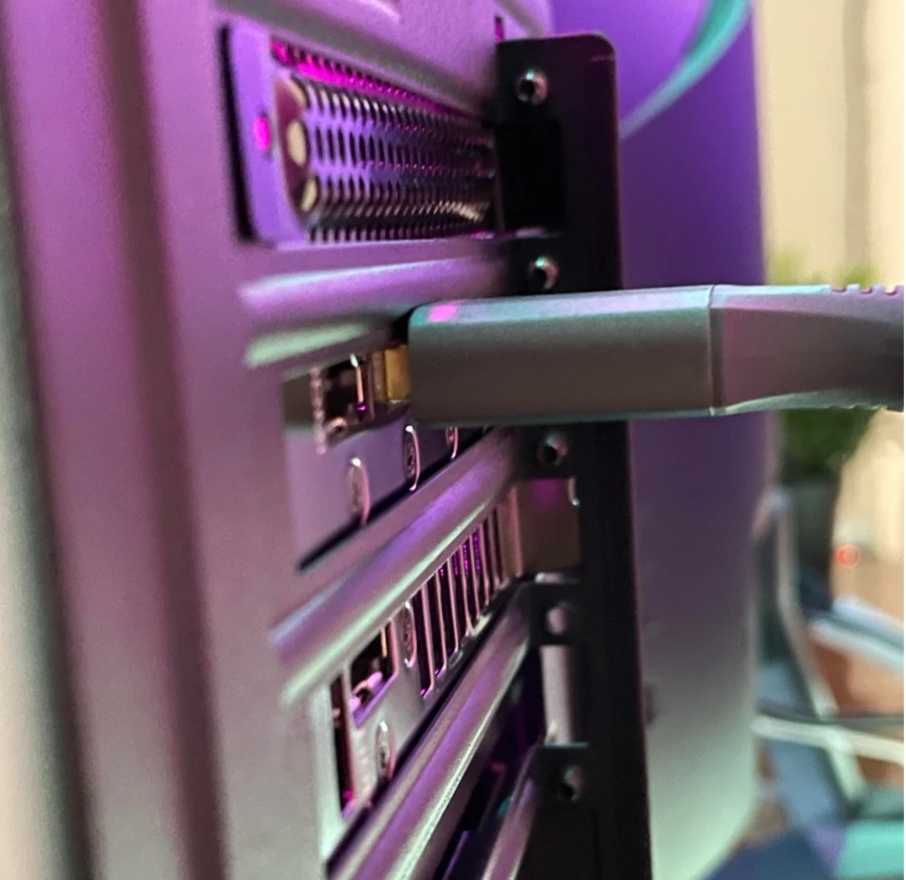
Make sure that your video card was installed correctly, there has been times where I open a new pre built computer out of the box, and video card installed wrong.
Which as you can see in the picture here, the Faceplate of the Graphics Card is somewhat being blocked by the metal of the computer case. which could prevent you from plugging your cables in all the way.

if this is your problem, its an easy fix, just unscrew the Guard holding the height of the card, gently wiggle it down, and put the screw back on tight.

This post was edited by conetopia on Oct 7 2025 01:18am
Go Back To Computer Building Topic List
Prev12
Add Reply New Topic New Poll