d2jsp
Log InRegister
d2jsp Forums > d2jsp > General Help > How Do I Post A Pic In My Thread?
Add Reply New Topic
Member
Posts: 1,400
Joined: Feb 23 2024
Gold: 0.00
Feb 27 2024 12:26am
it only shows a link when i use the IMG thing
Member
Posts: 1,593
Joined: Dec 21 2018
Gold: 105.00
Feb 27 2024 12:33am
https://imgur.com/

upload photo

then right click and "open image in new tab"

then copy link and paste in [IM G]link[ IMG]

This post was edited by Blyeyes on Feb 27 2024 12:34am
Member
Posts: 2,805
Joined: Feb 21 2007
Gold: 905.00
Feb 27 2024 12:34am
take an image that you posted on an image sharing site:

https://i.ibb.co/kMmGKTN/fdsf.png

highlight the link after you pasted it on your post and press this button:
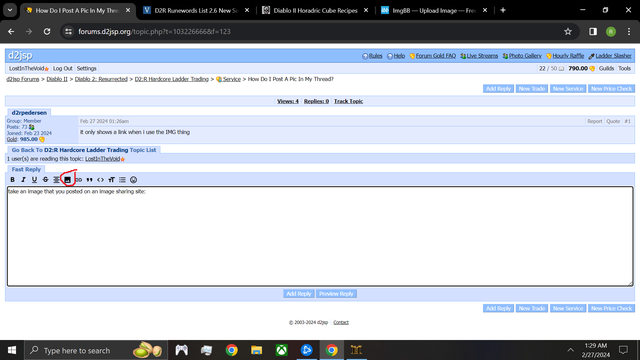


e/ you can always hit "preview post" to make sure you did it right. A lot of image sites will have a bunch of options for what kind of code for the image you want. You just want the direct link, generally it will be an https with the website and the name of your image with .png/.jpeg/ whatever type of image you're using

This post was edited by LostInTheVoid on Feb 27 2024 12:39am
Member
Posts: 1,400
Joined: Feb 23 2024
Gold: 0.00
Feb 27 2024 12:37am
https://imgur.com/a/sbFC2Cy

can you see anything?

On my screen it shows a link, not an actual picture, then i have to press the link.


This post was edited by d2rpedersen on Feb 27 2024 12:47am
Member
Posts: 2,805
Joined: Feb 21 2007
Gold: 905.00
Feb 27 2024 12:42am
Quote (d2rpedersen @ Feb 27 2024 01:37am)
https://imgur.com/a/sbFC2Cy

can you see anything?

On my screen it shows a link, not an actual picture, then i have to press the link.


nah, you need to highlight it and click the button that I circled in red on my image. It says "your image" when you click it. you clicked the one to the right of the one you should have clicked, which is for "your url"

This post was edited by LostInTheVoid on Feb 27 2024 12:43am
Go Back To General Help Topic List
Add Reply New Topic