Quote (OverDoSex @ Jul 5 2018 06:55pm)
The zoom feature is what I currently use, but it zooms everything, ultimately means distorted images and layouts. All I really need is the font
I see. Here, I crafted a mini CSS rule for you. It does textareas, descriptions, etc. While retaining image sizes so they are not distorted. Can use it with the free and open source Stylus extension:
Code
.desc, .edit, .mpl, .quote1, .sig, a.desc, .code2, body, button, input, select, textarea, * {
font-size: 16px
}
Chrome:
https://chrome.google.com/webstore/detail/stylus/clngdbkpkpeebahjckkjfobafhncgmne/related?hl=enFirefox:
https://addons.mozilla.org/en-US/firefox/addon/styl-us/Open Source Repo:
https://github.com/openstyles/stylusWhen you install it, open a new tab, go to
d2jsp.org, click on the top right and click
Write style for: d2jsp.org:
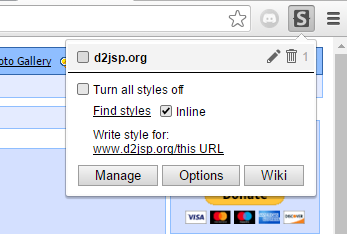
Once your on that page, type d2jsp.org in the text field, and copy the CSS code, like so:
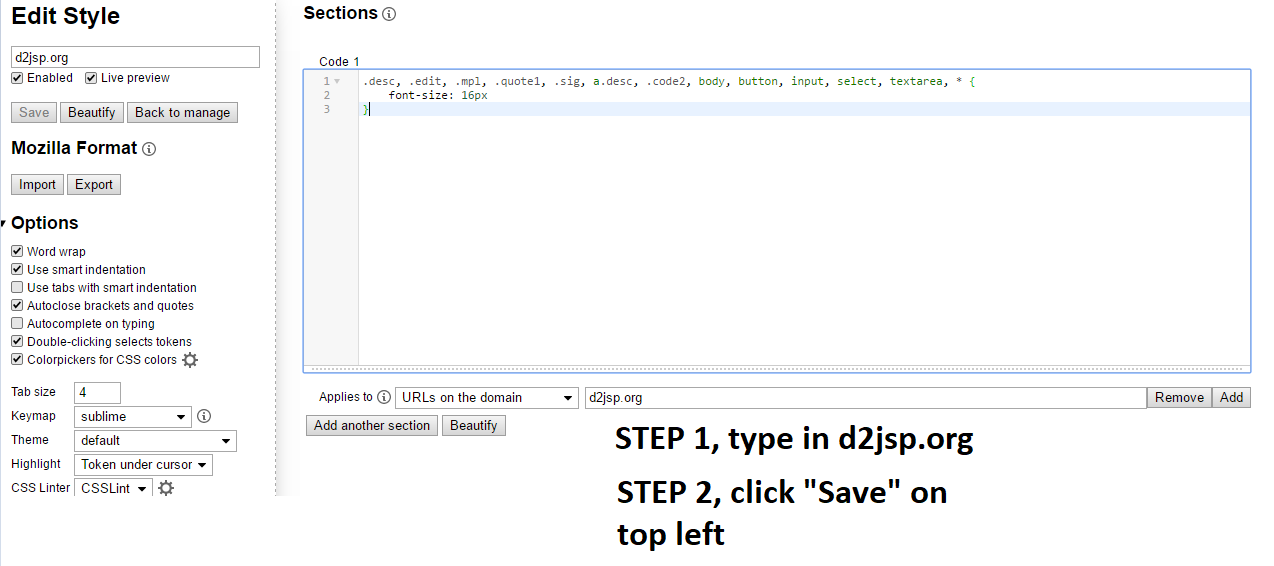
Then name it at the top left with whatever you want, and click save. You can modify the
`font-size: 16px` property, and change
16px to whatever you feel most comfortable with.
Hope that helps.
This post was edited by JohnMiller92 on Jul 5 2018 09:19pm Guests cannot view or vote in polls. Please register or login.