d2jsp
Log InRegister
d2jsp Forums > Off-Topic > Computers & IT > Computer Building > My New Computer Is In > Need A Little Help
Prev12345Next
Add Reply New Topic New Poll
Member
Posts: 21,380
Joined: Dec 23 2007
Gold: 1.00
Feb 13 2016 01:19pm
Quote (Juggalo_Mole @ Feb 13 2016 01:49pm)
Yes, i tried pulling another hdd that had windows installed but it wont load it because no drivers.

So my issue is now.

Got the keyboard and mouse working, my computer has no optical drive to install drivers from disc, once im inside windows it will not detect anything i plug in the usb slots, they are however all powered because they will charge my phone in every slot. I do have an external optical drive, but it wont detect it since it is usb powered.

Think i may have to but an internal drive just to install drivers, unless i can open my external and hope it has a sata slot on it.


there should be drivers with the new motherboard. Usually they ship them with a disc.
Member
Posts: 13,727
Joined: May 5 2006
Gold: 760.01
Feb 13 2016 02:59pm
Thats the issue, it wont detect ANY devices once inside windows besidea keyboard and mouse. So its impossible for me to install the drivers lol.

Member
Posts: 21,380
Joined: Dec 23 2007
Gold: 1.00
Feb 13 2016 03:16pm
You're going to have to reinstall Windows. Did you install with DVD or USB?

It should have put generic drivers in there just so you can boot up properly.

Which motherboard are you using? Also, make sure it isn't set to Universal Plug and Play in the BIOS. That will sometimes mess up with Windows.
Member
Posts: 27,782
Joined: Dec 19 2011
Gold: 3,012.50
Feb 13 2016 03:18pm
Quote (Juggalo_Mole @ Feb 13 2016 01:59pm)
Thats the issue, it wont detect ANY devices once inside windows besidea keyboard and mouse. So its impossible for me to install the drivers lol.


...

u were supposed to download saved files for all the updated drivers from respective manufacturers, and use a usb and drag it to ur desktop then install.

do u have a laptop? spare comp? smartphone? etc.? use one of those devices to dl the drivers then use a usb to drag it over to ur new comp
Member
Posts: 21,380
Joined: Dec 23 2007
Gold: 1.00
Feb 13 2016 03:22pm
Quote (Secksii @ Feb 13 2016 04:18pm)
...

u were supposed to download saved files for all the updated drivers from respective manufacturers, and use a usb and drag it to ur desktop then install.

do u have a laptop? spare comp? smartphone? etc.? use one of those devices to dl the drivers then use a usb to drag it over to ur new comp


It doesn't recognize his usb at all. That's his problem.
Member
Posts: 13,727
Joined: May 5 2006
Gold: 760.01
Feb 13 2016 03:42pm
Things i tried.

Reinstall windows, tried win 7 home, professional, ultimate, they all work but no plug and play works.

Reset cmos numerous times

Tried different ram slots, 1 stick, 2, etc.


I was able to get a cd drive to show up finalllllly, but yhe drive is broken and wont read cds hahahaha

So now im on a misson to find an internal cd drive tha no where hasunless ordered online.

Thanks all for the help so far also.

This post was edited by Juggalo_Mole on Feb 13 2016 03:42pm
Member
Posts: 105,141
Joined: Apr 25 2006
Gold: 10,475.00
Feb 13 2016 03:45pm
Did you try the RAM is slots 2 & 4 counting away from the CPU?

As for internal Optical drives...BestBuy amd WalMart have them. Not as cheap as online...but, they have 'em.

This post was edited by Ghot on Feb 13 2016 03:49pm
Member
Posts: 13,727
Joined: May 5 2006
Gold: 760.01
Feb 13 2016 03:47pm
Quote (Ghot @ Feb 13 2016 04:45pm)
Did you try the RAM is slots 2 & 4 counting away from the CPU?


Yes and for some reason when its in 2 and 4 the computer will not boot at all, i had to revert to using slot 3 and 4 because my cpu cooler is massive.


Walmart here only has externals so im on the hunt for part stores

This post was edited by Juggalo_Mole on Feb 13 2016 03:51pm
Member
Posts: 105,141
Joined: Apr 25 2006
Gold: 10,475.00
Feb 13 2016 03:52pm
Try this.


Forget the pwm cable on the fan controller for a bit.

Put the RAM (securely seated) in slots 2 & 4 counting away from the CPU....to the right, when the case is upright.


The main CPU cooler MUST be plugged into CPU_Fan 1 header on your motherboard.

Try that and see if it boots.


/e Also it would help to know motherboard make and model. :)

This post was edited by Ghot on Feb 13 2016 03:54pm
Member
Posts: 21,380
Joined: Dec 23 2007
Gold: 1.00
Feb 13 2016 03:54pm
Quote (Ghot @ Feb 13 2016 04:52pm)
Try this.


Forget the pwm cable on the fan controller for a bit.

Put the RAM (securely seated) in slots 2 & 4 counting away from the CPU....to the right, when the case is upright.


The main CPU cooler MUST be plugged into CPU_Fan 1 header on your motherboard.

Try that and see if it boots.


he's getting it to boot. It's not loading drivers.
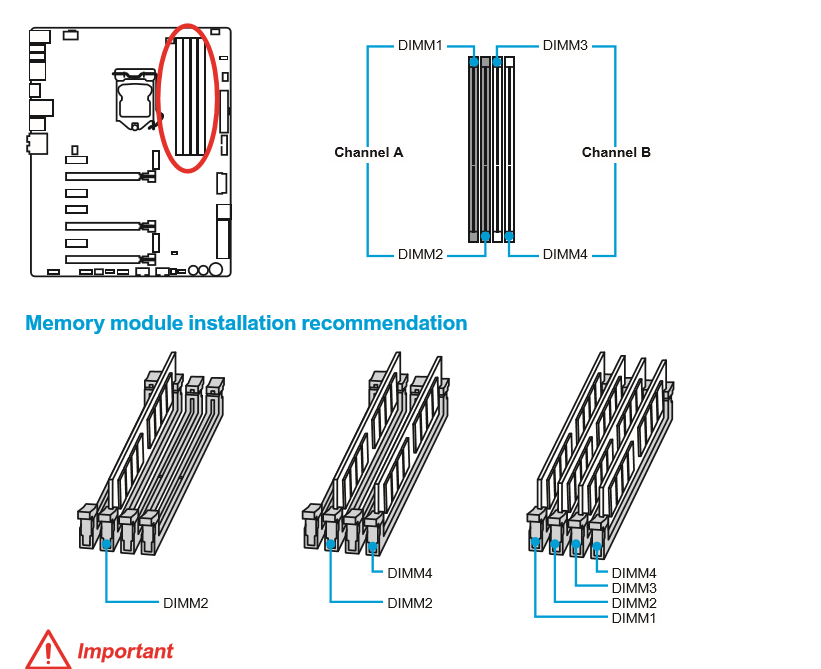

Here's where he is telling you to place the memory. It HAS to be in these slots to work correctly.

Edit: also are you sure it won't boot in Slot 2? If not then that's a RAM slot problem.

Biggest problem with the Hyper 212 is blocking the slots on a motherboard.

This post was edited by Deny on Feb 13 2016 03:56pm
Go Back To Computer Building Topic List
Prev12345Next
Add Reply New Topic New Poll