d2jsp
Log InRegister
d2jsp Forums > Off-Topic > Computers & IT > Booting Issue
Add Reply New Topic New Poll
Member
Posts: 5,664
Joined: Feb 2 2011
Gold: 978.00
Mar 25 2022 02:47am
A good part of the time when I turn on my computer I'll just see a blank, black screen. Nothing will load at any point.
I'm forced to hold the power button (no command of any sort that I've tried has worked).

This has been happening for maybe close to a year now, possibly a little more, and I've had the Laptop I would say just over two years, I think?
Bought it new for what it's worth.

Using a Dell G5 5590.
Windows 11 (Although this error happened on 10 prior to accidentally upgrading).
Can provide further specs as/if needed.

I was told I should try and load the BIOS and do something there, but I can't remember what. I didn't really pursue anything
at the time, but figured I'd give this post a shot before attempting anything for once.
Member
Posts: 14,746
Joined: Nov 30 2005
Gold: 16,276.50
Mar 25 2022 06:51am
I had a similar issue, ended up being the HDD failing, could start with a quick memory test if you can get there
Member
Posts: 5,664
Joined: Feb 2 2011
Gold: 978.00
Mar 25 2022 02:21pm
Quote (kyle_z @ 25 Mar 2022 08:51)
I had a similar issue, ended up being the HDD failing, could start with a quick memory test if you can get there


I have both an HDD + SSD (The OS is on the SSD). Do you still think a problem with the HDD would effect things despite the OS' location?

I'm not particularly well-versed with this kind of thing, so bear with me here. I'm all ears though. How do I do a "memory test"?
Member
Posts: 14,746
Joined: Nov 30 2005
Gold: 16,276.50
Mar 25 2022 03:11pm
Quote (Unconscious @ Mar 25 2022 04:21pm)
I have both an HDD + SSD (The OS is on the SSD). Do you still think a problem with the HDD would effect things despite the OS' location?

I'm not particularly well-versed with this kind of thing, so bear with me here. I'm all ears though. How do I do a "memory test"?


probably not, most likely another issue. do you get any type of boot screen? so you can get into bios with f2/f12 or w/e it is

This post was edited by kyle_z on Mar 25 2022 03:13pm
Member
Posts: 5,664
Joined: Feb 2 2011
Gold: 978.00
Mar 25 2022 04:23pm
Quote (kyle_z @ 25 Mar 2022 17:11)
probably not, most likely another issue. do you get any type of boot screen? so you can get into bios with f2/f12 or w/e it is


No. Nothing at all, actually. I'll have to try the function keys above. Will Google it to double check and look into this further there as well. I just hope this doesn't become some kind of permanent thing.
Member
Posts: 4,137
Joined: Oct 2 2008
Gold: 796.00
Mar 25 2022 06:56pm
well HDD or SSD, I think the issue of failing storage was the point there. you should run the on-board Dell hardware diagnostics, or go here: https://www.dell.com/support/home/en-us/product-support/product/g-series-15-5590-laptop/diagnose and run the test. you might need to install their assist program to do it. that will run a quick test on the memory, but you could make a bootable flash drive of something called memtest to really be sure: https://www.memtest86.com/ - you can post for help with that. cool hicks sig.
Member
Posts: 5,664
Joined: Feb 2 2011
Gold: 978.00
Mar 26 2022 02:00am
Quote (purplex @ 25 Mar 2022 20:56)
well HDD or SSD, I think the issue of failing storage was the point there. you should run the on-board Dell hardware diagnostics, or go here: https://www.dell.com/support/home/en-us/product-support/product/g-series-15-5590-laptop/diagnose and run the test. you might need to install their assist program to do it. that will run a quick test on the memory, but you could make a bootable flash drive of something called memtest to really be sure: https://www.memtest86.com/ - you can post for help with that. cool hicks sig.


Alright, thank you very much. I'll give this a shot later today and see what comes of it.

Thanks regarding the sig. He's said much, but that one thing in particular has really stuck with me.
Member
Posts: 5,664
Joined: Feb 2 2011
Gold: 978.00
Mar 26 2022 09:19am
Quote (purplex @ 25 Mar 2022 20:56)
well HDD or SSD, I think the issue of failing storage was the point there. you should run the on-board Dell hardware diagnostics, or go here: https://www.dell.com/support/home/en-us/product-support/product/g-series-15-5590-laptop/diagnose and run the test. you might need to install their assist program to do it. that will run a quick test on the memory, but you could make a bootable flash drive of something called memtest to really be sure: https://www.memtest86.com/ - you can post for help with that. cool hicks sig.


Update: Apparently my SDD is failing according to the diagnostic I ran. I swapped out the original one it came with for a Samsung EVO 970 Plus. I can't remember how soon this started happening though. It's been several months I think since I took out the old SSD (after copying everything on it and putting it on the soon to be new one). I bought it off Amazon and installed it myself. Should I go over to Samsung forums and ask around? I'm guessing so. I hope I don't need to recopy everything on it, buy a new one, then do the same thing again (this isn't why I changed the first one to begin with though).
Member
Posts: 9,066
Joined: Jun 6 2009
Gold: 0.00
Apr 3 2022 07:56am
Quote (Unconscious @ 25 Mar 2022 03:47)

Using a Dell G5 5590.
Windows 11 (Although this error happened on 10 prior to accidentally upgrading).


Sometimes there can be a weak Ribbon connector in a laptop, and a light shake would obviously fix it.
But by the sounds of it, there seems to be a conflicting issue thats related to windows update.
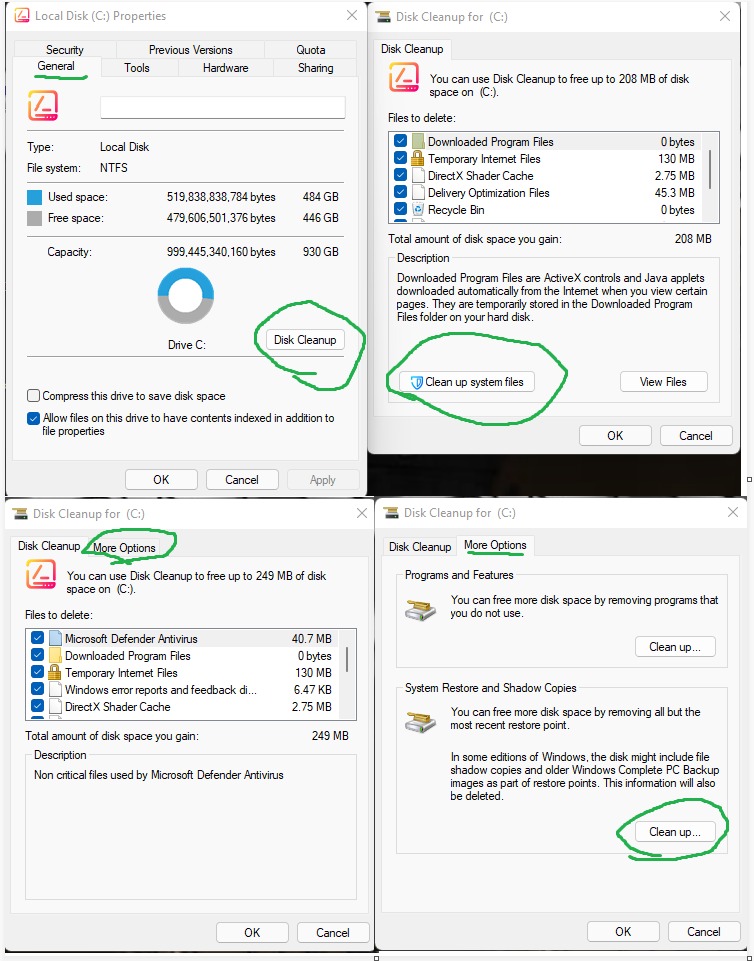
What I would personally recommend is running Disk Cleanup, and clicking ok, then open it back up and click the clean up system files and click ok on that, and then repeat them steps a 3'rd time to get to more options to clean up the system restore and shadow copies.
This will clean up temporary files related to system updates, allowing them to load fresh the next time you attempt to do windows updates. and cleaning up the system restore/shadow copies, will delete any old backups that are not being used.

Once you complete these steps, then you would want to restart, then run a disk De-fragment.
Then turn the laptop off for about 3 minutes ( Preferably Take out the battery if not too much of a hassle ).

Then turn the laptop on, run windows update , download anything if possible. and then all problems should be fixed.
Go Back To Computers & IT Topic List
Add Reply New Topic New Poll