d2jsp
Log InRegister
d2jsp Forums > Off-Topic > Computers & IT > New Build Won't Turn On
12Next
Add Reply New Topic New Poll
Member
Posts: 6,176
Joined: Dec 3 2011
Gold: 32,130.65
Nov 22 2019 07:10am
I am having a problem with a new build. I put everything in correctly I believe and I can't find a power switch on the motherboard to see if it'll turn on that way. I could really use some help here is the list of parts I used https://pcpartpicker.com/list/WQqzNq
Member
Posts: 73,505
Joined: Aug 14 2007
Gold: 6,940.52
Nov 22 2019 08:04am
Flip psu switch?
Hold delete key when hitting power (still a thing? )
Member
Posts: 8,170
Joined: Aug 3 2005
Gold: 9,142.00
Nov 22 2019 08:57am
Note:The MSI X570-A PRO ATX AM4 Motherboard has an additional 4-pin ATX power connector but the SeaSonic FOCUS Plus Gold 650 W 80+ Gold Certified Fully Modular ATX Power Supply does not. This connector is used to supply additional 12V current to the motherboard. While the system will likely still run without it, higher current demands such as extreme overclocking or large video card current draws may require it


maybe?
Member
Posts: 109,874
Joined: Feb 1 2006
Gold: 10,152.00
Nov 22 2019 10:11am
Quote (stokley @ Nov 22 2019 09:57am)
Note:The MSI X570-A PRO ATX AM4 Motherboard has an additional 4-pin ATX power connector but the SeaSonic FOCUS Plus Gold 650 W 80+ Gold Certified Fully Modular ATX Power Supply does not. This connector is used to supply additional 12V current to the motherboard. While the system will likely still run without it, higher current demands such as extreme overclocking or large video card current draws may require it


maybe?


Nope, the additional 4-pin is for EXTRA power consumption.

@op, start by reseating everything,wires included.

When you say you can't find power button does that mean you didn't set up the front headers?
if not that's your issue and if you did confirm there on the right pins, refer to mobo.

This post was edited by King Atrhur on Nov 22 2019 10:13am
Member
Posts: 57,234
Joined: Oct 14 2010
Gold: 57,480.92
Nov 22 2019 07:28pm
Just out of curiosity do you already have everything in the case when you tried to power it?
Member
Posts: 10,965
Joined: Jun 12 2012
Gold: 0.00
Trader: Trusted
Nov 22 2019 07:35pm
Quote (Applecrack @ Nov 22 2019 03:28pm)
Just out of curiosity do you already have everything in the case when you tried to power it?


i see where you're going (fpanel connector) ^_^

op, do you have everything put inside your case and your fpanel connectors on your mobo?
are you trying to turn it on from the power button/switch on the case or are you trying to turn it on outside the case?
Member
Posts: 57,234
Joined: Oct 14 2010
Gold: 57,480.92
Nov 23 2019 12:01am
Quote (roadtree @ Nov 22 2019 06:35pm)
i see where you're going (fpanel connector) ^_^

op, do you have everything put inside your case and your fpanel connectors on your mobo?
are you trying to turn it on from the power button/switch on the case or are you trying to turn it on outside the case?


actually no
some people forget to put the brass standoffs in their case and wonder why it wont power on
Member
Posts: 6,176
Joined: Dec 3 2011
Gold: 32,130.65
Nov 24 2019 07:12pm
Quote (Applecrack @ Nov 22 2019 10:01pm)
actually no
some people forget to put the brass standoffs in their case and wonder why it wont power on


Brass standoffs? This could be the issue I never put those in could you please explain and also I'm trying to turn it on with the power button on the outside of the case I'm not even sure where a different power button would be. Thanks all for the help
Member
Posts: 57,234
Joined: Oct 14 2010
Gold: 57,480.92
Nov 24 2019 08:25pm
Quote (Weeny @ Nov 24 2019 06:12pm)
Brass standoffs? This could be the issue I never put those in could you please explain and also I'm trying to turn it on with the power button on the outside of the case I'm not even sure where a different power button would be. Thanks all for the help


There are little brass screws that come with your motherboard screw bag.
You put them in the screw slots on the case before you put your motherboard in. Then when you screw it down with the motherboard screws it grounds it.

I dont actually see a button on your motherboard for power and reset but maybe msi didnt have one for that model.
Mine has it in the right side of the board.
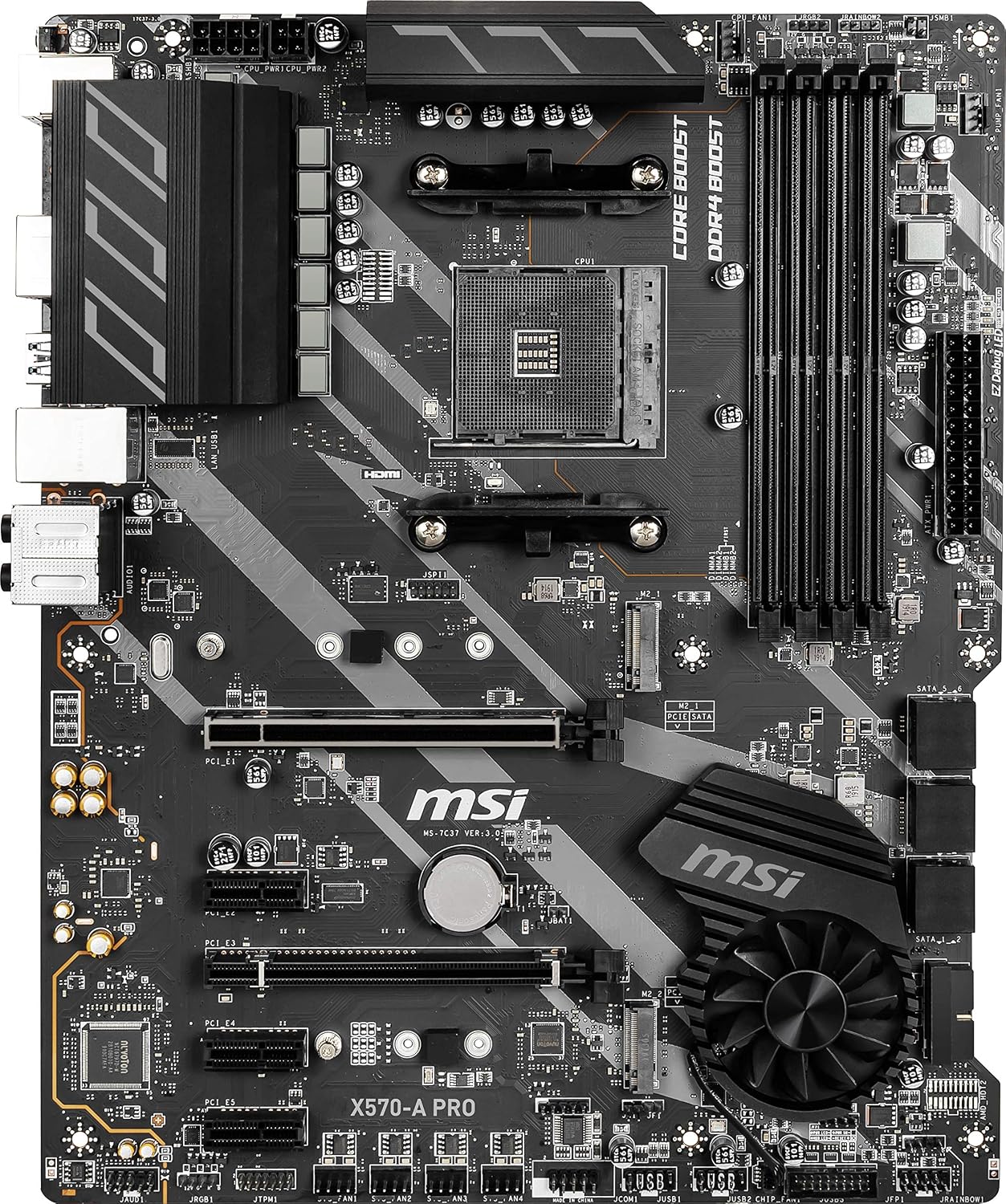


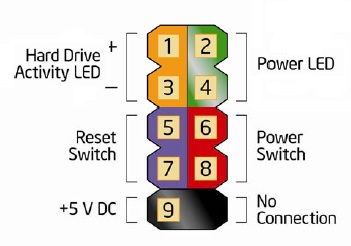
Looks like your front panel is on the bottom right? Its not labelled. Really not a great motherboard by the looks of it.
You can use a screwdriver to jump the power switch though.


This post was edited by Applecrack on Nov 24 2019 08:28pm
Member
Posts: 6,176
Joined: Dec 3 2011
Gold: 32,130.65
Nov 24 2019 08:28pm
Quote (Applecrack @ Nov 24 2019 06:25pm)
There are little brass screws that come with your motherboard screw bag.
You put them in the screw slots on the case before you put your motherboard in. Then when you screw it down with the motherboard screws it grounds it.

I dont actually see a button on your motherboard for power and reset but maybe msi didnt have one for that model.
Mine has it in the left side of the board.

https://images-na.ssl-images-amazon.com/images/I/91I6%2BuYinXL._SL1500_.jpg

Looks like your front panel is on the bottom right? Its not labelled. Really not a great motherboard by the looks of it.
You can use a screwdriver to jump the power switch though.

https://www.intel.com/content/dam/support/us/en/images/motherboards/desktop/sb/img/fp_header.jpg


You may of just solved my problem. I don't recall me or my brother ever putting those brass screws in I will look for them. And yeah I'm not impressed with the motherboard we were barely able to mount the graphics card.
Go Back To Computers & IT Topic List
12Next
Add Reply New Topic New Poll