d2jsp
Log InRegister
d2jsp Forums > Off-Topic > Computers & IT > Computer Problems
Add Reply New Topic New Poll
Member
Posts: 495
Joined: Aug 22 2012
Gold: 0.00
Jan 8 2017 01:51pm
so when i have a game opened on my first monitor, and have a stream opened on twitch on the second, if the game is focused the stream is lagging. vice versa, if the stream is focused, my game has lagging.

also, when i have the game opened and focused and i scroll on discord or on anything like chrome, it continues to lag with the game focused (game clicked on and not chrome or discord).

any suggestions?
i already reformatted my drive and wiped and reinstalled windows. updated graphics and mobo drivers.
game im running is WoW
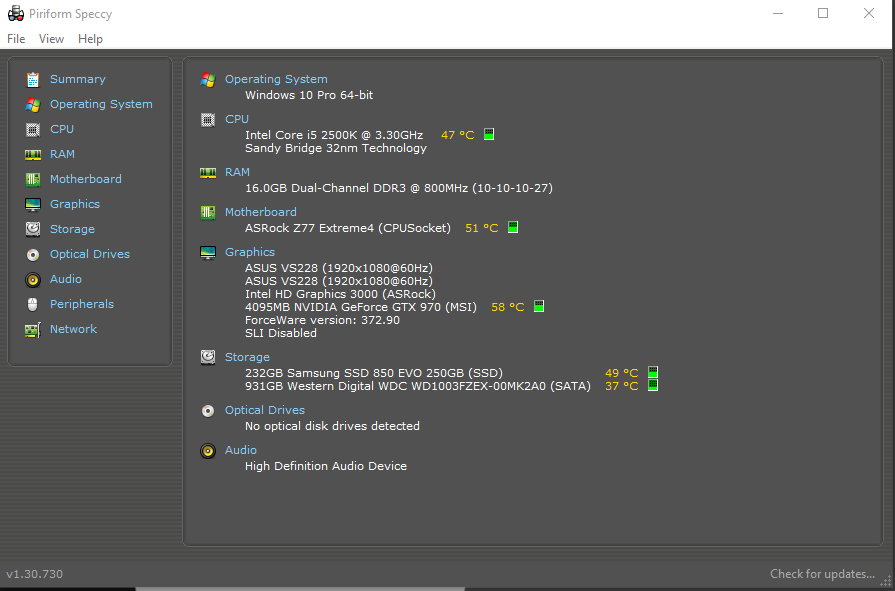


This post was edited by Falador on Jan 8 2017 01:52pm
Member
Posts: 20,978
Joined: Apr 19 2006
Gold: 85.00
Jan 8 2017 01:52pm
Were you able to do this before?
Member
Posts: 495
Joined: Aug 22 2012
Gold: 0.00
Jan 8 2017 01:52pm
Quote (yupitsmeh @ Jan 8 2017 12:52pm)
Were you able to do this before?


yeah, this problem started about two-three days ago.
Member
Posts: 20,978
Joined: Apr 19 2006
Gold: 85.00
Jan 8 2017 01:55pm
Quote (Falador @ Jan 8 2017 02:52pm)
yeah, this problem started about two-three days ago.


What happened in last couple days?
Drivers updated?
Member
Posts: 105,139
Joined: Apr 25 2006
Gold: 10,475.00
Jan 8 2017 01:58pm
Well there is a later driver for the vid card: 376.33 - WHQL


...and this...


Quote
Security patches KB 3205394, 3206632, 3205386 crash Active Directory Admin Center
Posted on January 6th, 2017 at 07:32 woody 19 comments

Reports are spreading.

InfoWorld Woody on Windows

So, anybody care to guess how Microsoft will handle this problem? We appear to have three Win10 cumulative updates and four Win7/8.1 monthly patches, all with the same bug. It’s not a big deal, unless you’re using the Active Directory Admin Center (or SCCM).

I see a few possibilities:

“Patch” ADAC (which probably isn’t broken)
Post a manual workaround and forget about it
Post hotfixes for the Win10 versions, or at least 1607
Re-release the Win7 and 8.1 patches

Let’s see how MS reacts.


https://www.askwoody.com/


....which may or may not have affected your computer.

This post was edited by Ghot on Jan 8 2017 02:00pm
Member
Posts: 495
Joined: Aug 22 2012
Gold: 0.00
Jan 8 2017 01:59pm
Quote (yupitsmeh @ Jan 8 2017 12:55pm)
What happened in last couple days?
Drivers updated?


nothing to be honest. just happened out of nowhere where I experience this. i restarted my computer the first day and it worked fine. second day, same thing and i restarted to fix it. today, i restarted and nothing.
also, it seems to go back to normal later on throughout the day but this is hours after boot.
Member
Posts: 495
Joined: Aug 22 2012
Gold: 0.00
Jan 8 2017 02:01pm
Quote (Ghot @ Jan 8 2017 12:58pm)
Well there is a later driver for the vid card: 376.33 - WHQL


...and this...


https://www.askwoody.com/


....which may or may not have affected your computer.


I do remember having a windows update but that was probably like four days ago.

Member
Posts: 105,139
Joined: Apr 25 2006
Gold: 10,475.00
Jan 8 2017 02:05pm
Well when you mentioned "two-three days ago"....

That's the only thing I can find in that time frame.


Also, if those are idle temps...you need to lower room temp or clean the dust out of your comp. Electronics don't like heat.

For example, here are my temps... take note of the SSD and HDD temps in yours, and the HDD temps in mine.


/e Compare my Motherboard temp...and yours. ^^

This post was edited by Ghot on Jan 8 2017 02:12pm
Banned
Posts: 22,577
Joined: Mar 11 2013
Gold: 0.00
Jan 8 2017 04:12pm
disable igpu in bios
Go Back To Computers & IT Topic List
Add Reply New Topic New Poll