d2jsp
Log InRegister
d2jsp Forums > Off-Topic > Computers & IT > Sli Assistance
Add Reply New Topic New Poll
Member
Posts: 17,729
Joined: Oct 25 2008
Gold: 333.25
Oct 16 2016 05:27am
Hi Guys.

I am trying to setup SLI on my second GPU and i cant seem to get any progress.

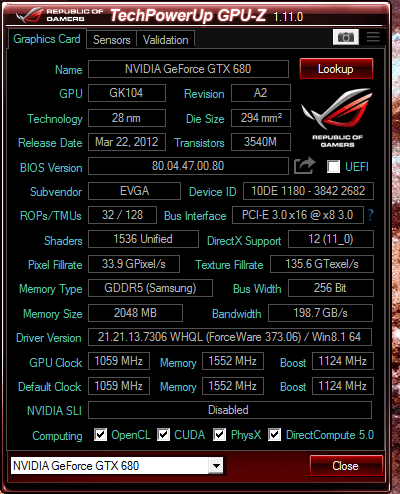
My first GPU is a GTX 680 EVGA super cloced; https://www.techpowerup.com/gpudb/b154/evga-gtx-680-superclocked
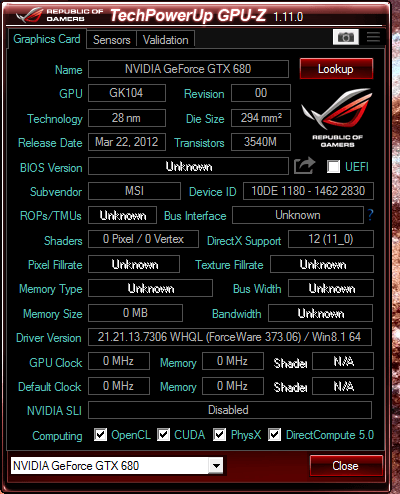
Second GPU is a GTX 680 MSI Lightning; https://www.techpowerup.com/gpudb/b330/msi-gtx-680-lightning

Both cards appear in device settings as well as in NVIDIA control panel.

I get the below screen shots on my GPU-Z when i first put the 2 GFX Cards in, i noticed that the second GPU has alot of unknown areas and isnt getting any MHz but i figured it want SLI's yet so i didnt bother too much, i still dont know if this is a root cause;

FIRST CARD


SECOND CARD


Anyways when i go to NVIDIA control panel and click apply on Maximise 3d performance the screens flash as they should but they automatically goes back to SLI DISABLED. No matter what i do its simply not working.

Specs below;

MB: Asus Zabretooth Z77 (SLI COMPATIBLE)
CPU: i7-3770K @ 3.5GhZ
PSU: 750W Gold Power Supply
OS: Windows 8.1


Any help would be greatly appreciated.
Member
Posts: 105,409
Joined: Nov 12 2007
Gold: 2,382,304.50
Oct 16 2016 06:08am
Try moving the sli bridge
Member
Posts: 17,729
Joined: Oct 25 2008
Gold: 333.25
Oct 16 2016 04:52pm
Done that and doesn't seem to change

Seems to me the second card is faulty or something
Member
Posts: 109,874
Joined: Feb 1 2006
Gold: 10,152.00
Oct 16 2016 05:20pm
Did you uninstall gpu software the reinstall after connecting both cards
Member
Posts: 16,272
Joined: Jun 22 2010
Gold: 83.19
Oct 17 2016 04:47am
Quote (Portmouth @ Oct 16 2016 04:52pm)
Done that and doesn't seem to change

Seems to me the second card is faulty or something


Evga cards will not sli with anything besides other evga cards. Found this out the hard way with my SSC 970.

Maybe the 680 is different.

This post was edited by frothyshoes on Oct 17 2016 05:12am
Member
Posts: 8,070
Joined: Sep 14 2014
Gold: 2,710.00
Oct 17 2016 05:33pm
Change your slot the card is plugged into. Also check the bios and see if the GPU is showing posted for that slot.
Member
Posts: 17,729
Joined: Oct 25 2008
Gold: 333.25
Oct 23 2016 03:42am
fixed it fellas

i tried 2 SLI beidges that were both faulty

just my luck
Member
Posts: 50,343
Joined: Apr 3 2008
Gold: 0.00
Oct 23 2016 02:32pm
Quote (Portmouth @ Oct 23 2016 02:42am)
fixed it fellas

i tried 2 SLI beidges that were both faulty

just my luck


Faulty?

Are you sure you had them pressed on all the way? Can't really see a bridge being faulty, Unless you bent the cable in half & broke the traces.
Go Back To Computers & IT Topic List
Add Reply New Topic New Poll