d2jsp
Log InRegister
d2jsp Forums > Off-Topic > Computers & IT > Fg For Internet Help
Add Reply New Topic New Poll
Member
Posts: 729
Joined: Mar 10 2021
Gold: 2,803.41
Jul 9 2023 03:35pm
Dont really know much about PC's or internet, only a small amount.
I rubberband in videogames quite a bit. I bought an aftermarket modem/router hardwired to my PC for an internet connection.
My ping is really low, and my PC isnt really bad. I also pay for the highest quality internet thats available to a residential home.
Anyone could PM me I have discord if you think you can troubleshoot it, im willing to pay a fair amount of FG for help.

Any help is appreciated, thanks.
Member
Posts: 9,066
Joined: Jun 6 2009
Gold: 0.00
Jul 11 2023 09:37pm
www.speedtest.net
If you have Smooth straight Lines, your internet is good.
If you have rough lines / Triangles , your internet is bad.

Assuming you have 1 modem + 1 router , you could try hard wiring the modem directly to pc, to test lines as well to see if you get better results.
If yes, then your router is bad, poor wires, or is not up to date.
If No, the Coax Cables that you screw onto the back of the modem , to the outside pole of your home, needs to be replaced. ( most internet company will charge a $50 service fee ).

The Only Other thing I can think of, is your Using Old Cat 5 Ethernet Cables, instead of Cat 6,7,8, or even the latest 9. ( Cat 6 Seems to work decent in most areas )
Ethernet Cables have writing on them, and should tell you what version you have.


------
Could it be your computer???
Sometimes if your just using the default Lan driver, that could cause rubber banding even though your download speeds seem to be high/good.
You always want to check that first to see if you have the latest version installed.


Member
Posts: 729
Joined: Mar 10 2021
Gold: 2,803.41
Jul 18 2023 06:41pm
Still have not solved this.
I had an aftermarket router/modem. I assumed it was the problem and bought new. It didnt fix.
I updated my lan drivers as poster above stated, I also bought a new ethernet cable.
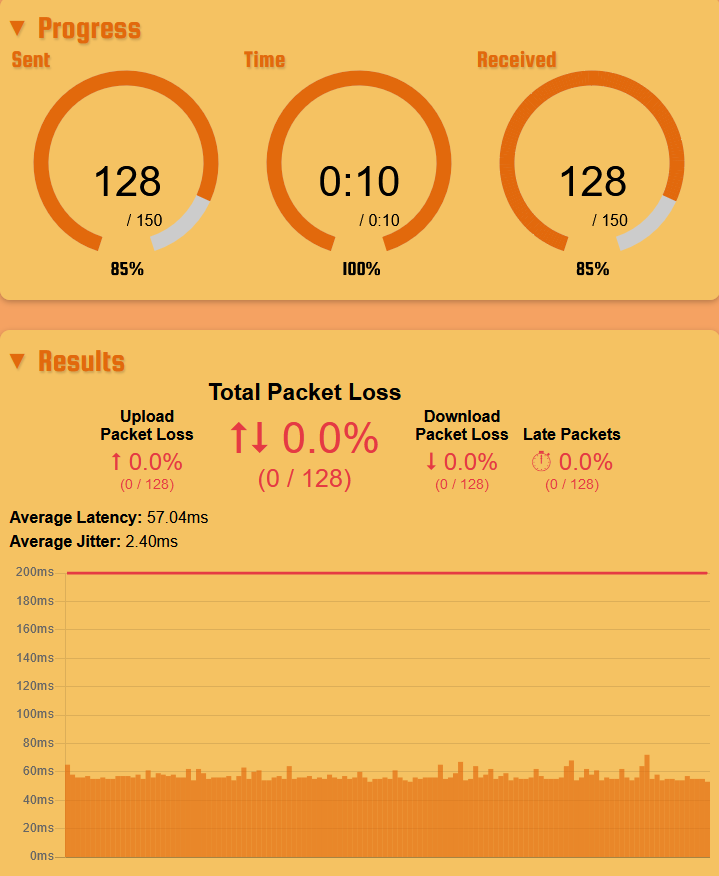
Someone sent me to this website to test my internet https://packetlosstest.com/ and the bar graph has spikes in it instead of being flat, I dont know what to do with the information though.
Thanks for anyone/everyone trying to help, I have no idea what to do.
Member
Posts: 9,066
Joined: Jun 6 2009
Gold: 0.00
Jul 22 2023 12:05am


never heard of this website, but i did a test, and its a bit bumpy, no spikes though.

If your directly connected to the modem, and still have anything worse than what im seeing.
Then you need to contact your ISP, and have them check your Coax cable from the back of the modem to the outside of your home/building ect going out to the pole.
Normally recommended to get fresh cable every 6-8 years, if they haven't done it, now would definitely be the time to have that done. ( They may charge a $50 service fee )


If you have any Modems/Routers that say Docsis 3.0 , that is old.
If you have the brand TP_LINK , throw that shit outta the window.

Hope any of this information helps !
Member
Posts: 359
Joined: Apr 2 2013
Gold: 2,022.50
Sep 2 2023 09:07am
Hi There, try running a pathping, here is an article from blizzard: https://us.battle.net/support/en/article/7871

remember you have to open icmp on your router/firewall to get a reply back. If you can run a traceroute from your edge device, this can help you troubleshoot. IF this comes back at no packet loss, then something on your PC is causing it.
Try another machine and see if you get those results.

Also, check that you are running 1GB on your ethernet from your LAN to your WAN, mismatched interface speeds can have buffering issues.

This post was edited by grulag on Sep 2 2023 09:19am
Go Back To Computers & IT Topic List
Add Reply New Topic New Poll