d2jsp
Log InRegister
d2jsp Forums > Off-Topic > Computers & IT > I Want One Of These Asus Desktops
Prev1234Next
Add Reply New Topic New Poll
Member
Posts: 74,860
Joined: Jul 22 2008
Gold: 0.00
Apr 7 2022 11:58pm
i came home and the case is really warm seems like there are no fans in front not sure though and back fan spins once in a blue moon


This post was edited by HuL on Apr 8 2022 12:03am
Member
Posts: 9,066
Joined: Jun 6 2009
Gold: 0.00
Apr 8 2022 02:44am
Quote (purplex @ 7 Apr 2022 21:07)
HuL why is your keyboard inside your computer case thats dangerous


Thats hilarious :lol:
Member
Posts: 9,066
Joined: Jun 6 2009
Gold: 0.00
Apr 8 2022 02:46am
Quote (HuL @ 8 Apr 2022 00:58)
i came home and the case is really warm seems like there are no fans in front not sure though and back fan spins once in a blue moon

https://i.imgur.com/7D8iAms.jpg


https://i.imgur.com/lfecDGO.jpghttps://i.imgur.com/4djaPmX.jpg


Told you Fans sucked, Should of got aftermarket.
Member
Posts: 74,860
Joined: Jul 22 2008
Gold: 0.00
Apr 8 2022 11:00am
Quote (conetopia @ Apr 8 2022 01:46am)
Told you Fans sucked, Should of got aftermarket.


fixed it tbh the reviewers dont know jack about computers
back fan runs 100% all the time now
the case feels cooler now

all i needed was some night rest and sleep to think about it


This post was edited by HuL on Apr 8 2022 11:21am
Member
Posts: 9,066
Joined: Jun 6 2009
Gold: 0.00
Apr 8 2022 11:34am


Quote (HuL @ 8 Apr 2022 12:00)
fixed it tbh the reviewers dont know jack about computers
back fan runs 100% all the time now
the case feels cooler now

all i needed was some night rest sleep and to think about it


Not sure if your referring to reviewers on the store page, or online general, or if you were referring to us on d2jsp.
But in general your correct most do not know a lot, some may know a few things but not very well at optimizing things.

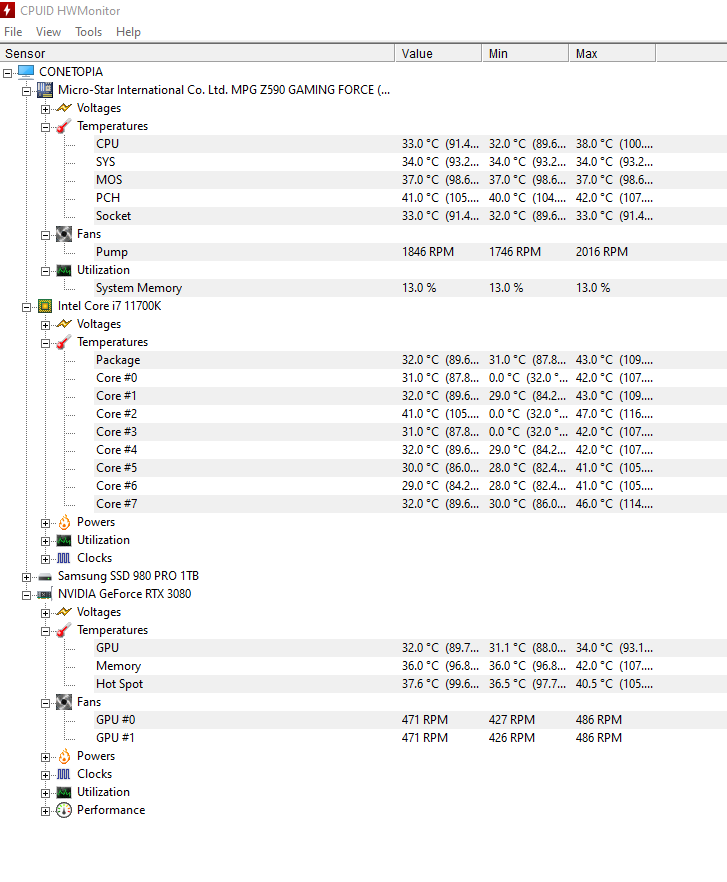
I posted my Temps/Speeds for you to kinda compare since we have Similar Main parts.

(you may or may not know this ) - Figured I would mention it.
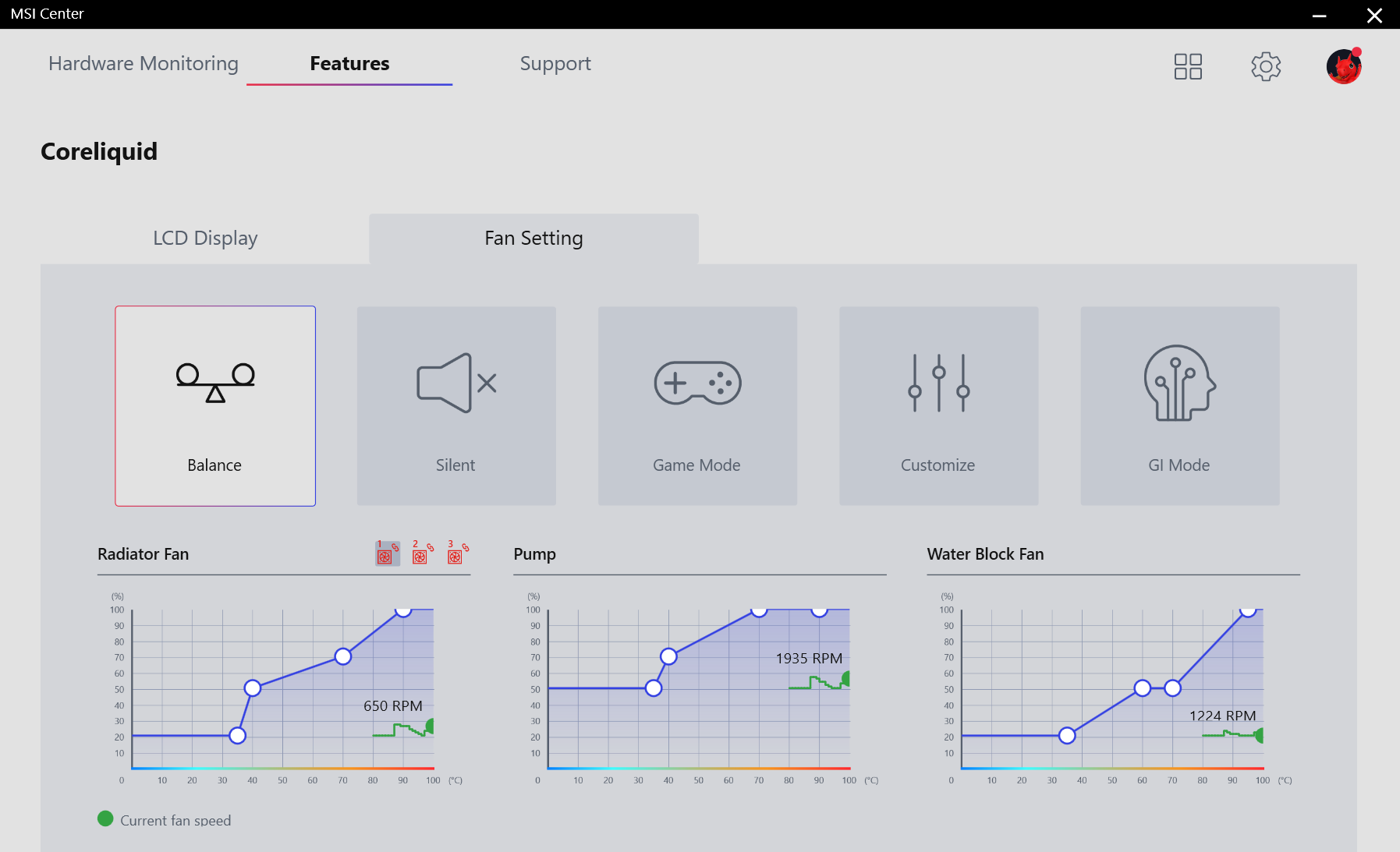
( As some may not know or not concerned ) Ideally you want your Fans set to Automatic , so that the speed Fluctuates. Otherwise full speed will shorten the life of the fan.
If Fan fluctuates it will show signs of end of life lets say 5-10 years from now, but if you have it running at 100% , it may die 1-3 years from now , and show no signs, you won't even know it died, and then all the sudden 2 minutes goes by, your cpu temps sky rocket and KABOOM !
( Most Bios have a Safety setting for that now, ) But its still nice to know, so you can plan to get another, rather then it being unexpected.

You could Set it to Automatic / Gamer Mode, that way the fans run 65-100% at all times.
Case/CPU

MSI afterburner you could download, click settings and enable default Fan curve.
This will Bump your Fan speed Curve , which in general makes the Fans run 8% faster on average Based on Usage/Temps.


Member
Posts: 74,860
Joined: Jul 22 2008
Gold: 0.00
Apr 8 2022 11:37am
ya i set it to automatic just now thanks for information
i was referring to best buy reviews some were good like the 500w psu but the fan not spinning review isnt


This post was edited by HuL on Apr 8 2022 11:41am
Member
Posts: 74,860
Joined: Jul 22 2008
Gold: 0.00
Apr 8 2022 11:48am
Quote (conetopia @ Apr 8 2022 10:34am)
https://i.gyazo.com/caf151b8a064cb17921bb1e6c7b3ed20.png
https://i.gyazo.com/9410b6f33d24871bab71d361a269972e.png


Not sure if your referring to reviewers on the store page, or online general, or if you were referring to us on d2jsp.
But in general your correct most do not know a lot, some may know a few things but not very well at optimizing things.

I posted my Temps/Speeds for you to kinda compare since we have Similar Main parts.

(you may or may not know this ) - Figured I would mention it.
( As some may not know or not concerned ) Ideally you want your Fans set to Automatic , so that the speed Fluctuates. Otherwise full speed will shorten the life of the fan.
If Fan fluctuates it will show signs of end of life lets say 5-10 years from now, but if you have it running at 100% , it may die 1-3 years from now , and show no signs, you won't even know it died, and then all the sudden 2 minutes goes by, your cpu temps sky rocket and KABOOM !
( Most Bios have a Safety setting for that now, ) But its still nice to know, so you can plan to get another, rather then it being unexpected.

You could Set it to Automatic / Gamer Mode, that way the fans run 65-100% at all times.
Case/CPU

MSI afterburner you could download, click settings and enable default Fan curve.
This will Bump your Fan speed Curve , which in general makes the Fans run 8% faster on average Based on Usage/Temps.


i will get an after market cpu cooler something low profile like the thermaltake toughair 110

This post was edited by HuL on Apr 8 2022 11:49am
Member
Posts: 74,860
Joined: Jul 22 2008
Gold: 0.00
Apr 8 2022 11:57am
actually set fan speed profile to turbo and cpu temps lowered i'll just leave it at that


This post was edited by HuL on Apr 8 2022 11:58am
Member
Posts: 9,066
Joined: Jun 6 2009
Gold: 0.00
Apr 8 2022 12:00pm
Sounds good.
Member
Posts: 4,137
Joined: Oct 2 2008
Gold: 796.00
Apr 8 2022 02:57pm
HuL maybe the fan was shutting off because the system was not under load.

you should add an intake fan, or more RGB, not sure which.

edit: what happened to the other desktop?

This post was edited by purplex on Apr 8 2022 02:58pm
Go Back To Computers & IT Topic List
Prev1234Next
Add Reply New Topic New Poll