d2jsp
Log InRegister
d2jsp Forums > Off-Topic > Computers & IT > How Do I Get The Wireless Icon On My Desktop? > Gaming Desktop Btw
1235Next
Add Reply New Topic New Poll
Member
Posts: 35,671
Joined: Aug 11 2008
Gold: 2,130.00
Jan 12 2018 06:37pm
how do i get the wireless icon (5 bars) on my desktop?

Currently I have the icon with computer monitor and a X on it... even though my internet is working.

is wireless icon not recommended for gaming desktop?
Member
Posts: 10,281
Joined: Jan 7 2015
Gold: Locked
Warn: 60%
Jan 12 2018 07:33pm
Member
Posts: 35,671
Joined: Aug 11 2008
Gold: 2,130.00
Jan 12 2018 09:32pm


this is what my icon looks like... but my internet is still working at the moment

how do i get the wireless icon like the one below?


This post was edited by FamilyGuyViewer on Jan 12 2018 09:32pm
Member
Posts: 105,134
Joined: Apr 25 2006
Gold: 10,475.00
Jan 13 2018 03:31am
Quote (FamilyGuyViewer @ Jan 12 2018 10:32pm)
https://i.imgur.com/pmnnpoA.png


this is what my icon looks like... but my internet is still working at the moment

how do i get the wireless icon like the one below?

http://palaisdesbeauxarts.at/img/erik/4_Signal_Bars.png


That icon with the red X, looks like a "wired" icon. If you are only using wireless, that is why it has a red X.
First thing you need to do is FIND the wireless icon, then you should be able to right click it and choose: send/pin to System Tray.

You can't "change" a wired icon, into a wireless icon though.
Member
Posts: 105,134
Joined: Apr 25 2006
Gold: 10,475.00
Jan 13 2018 04:12am
Here is some info I found...

http://www.intowindows.com/fix-wireless-icon-missing-from-taskbar-in-windows-10/


/e I'm guessing you have Windows 10.

This post was edited by Ghot on Jan 13 2018 04:13am
Member
Posts: 10,281
Joined: Jan 7 2015
Gold: Locked
Warn: 60%
Jan 13 2018 05:18am
if you disable your ethernet in the list of network adapters that might also work.
Member
Posts: 35,671
Joined: Aug 11 2008
Gold: 2,130.00
Jan 13 2018 12:35pm
Quote (Ghot @ Jan 13 2018 04:31am)
That icon with the red X, looks like a "wired" icon. If you are only using wireless, that is why it has a red X.
First thing you need to do is FIND the wireless icon, then you should be able to right click it and choose: send/pin to System Tray.

You can't "change" a wired icon, into a wireless icon though.


where can i find the wireless icon?

i am using windows 7

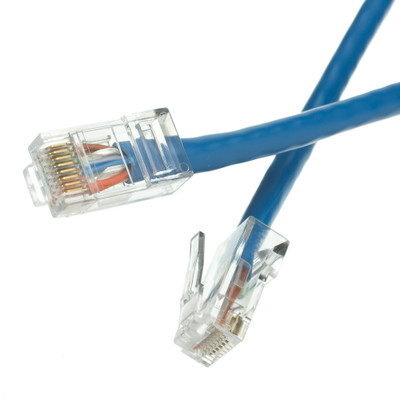
and i conenct to the internet with a blue cable on my desktop...


lately the internet speed is going slow for my desktop idk why... im trying to fix it. my laptop tat is connected to my wifi is working fine... but its jsut my desktop.
like images are loading very slow and videos take longer than usual to buffer

This post was edited by FamilyGuyViewer on Jan 13 2018 12:36pm
Member
Posts: 32,103
Joined: Dec 29 2009
Gold: 0.00
Jan 13 2018 03:05pm
Fixing a "Red X on Network Icon Even Though Internet Works" issue is a registry fix that involves service account permissions on the NetworkList key, but it's not something I can easily describe how to fix via text.

Basically, the Network List Service is lacking permissions it needs to enumerate the list of networks on the system, which creates the Red X.
Member
Posts: 4,297
Joined: Apr 6 2007
Gold: 1,725.00
Jan 14 2018 08:26am
First of all, do you have a wireless adapter on your desktop?
Member
Posts: 35,671
Joined: Aug 11 2008
Gold: 2,130.00
Jan 14 2018 02:20pm
Quote (Surfpunk @ Jan 13 2018 04:05pm)
Fixing a "Red X on Network Icon Even Though Internet Works" issue is a registry fix that involves service account permissions on the NetworkList key, but it's not something I can easily describe how to fix via text.

Basically, the Network List Service is lacking permissions it needs to enumerate the list of networks on the system, which creates the Red X.


how can i fix this? and is this a main concern?


Quote (bwuahaha @ Jan 14 2018 09:26am)
First of all, do you have a wireless adapter on your desktop?


im not sure, how do i check if i have that. im using somethin that looks like this that conects to the internet. its plugged to my dekstop and to my modem
Go Back To Computers & IT Topic List
1235Next
Add Reply New Topic New Poll