d2jsp
Log InRegister
d2jsp Forums > Off-Topic > International > Magyar > Magyar GFX Sticky > Minden, Ami Grafika
Prev19101112131311Next
Closed New Topic New Poll
Member
Posts: 45,021
Joined: Jul 28 2005
Gold: 47.25
Jan 28 2008 12:48pm
Quote (lowxair @ Mon, 28 Jan 2008, 19:45)
szép lett de a jobb oldala üreske sztem^^


Ja akartam oda egy ilyen tukrozodest, de szarul nezett ki biggrin.gif

Quote (Nerz8 @ Mon, 28 Jan 2008, 19:46)
nekem ez is tetszik, ezzel a stockkal tök jó sigeket csinálsz ^^ btw ehhez a fény-effekthez van vmi tutorial mert érdekelne tongue.gif


Az csak annyi, hogy uj layer linear dodge blending mode-on.
Arra teszel nehany soft round brush pontot sotetebb arnyalatokkal, pl sotet kek, es abbol lesz ilyen vilagito vilagoskek szin.
Probalgasd kicsit, tok fun ezzel szorakozni biggrin.gif De nem minden sigfelehez illik.
Member
Posts: 6,822
Joined: Aug 22 2007
Gold: 0.70
Jan 28 2008 01:03pm
láttam olyan sigeket, hogy az alsó részén víz van (ami hullámzik) és visszatükröződik a felső rész. Vagy van olyan amikor beleesik egy vízcsepp. Ilyen tutja van valakinek? Vagy valaki leírná, hogy olyat hogyan kell? Nekem nagyon bejön ^^
Member
Posts: 4,065
Joined: Oct 4 2007
Gold: 4.19
Warn: 10%
Jan 28 2008 01:12pm
Quote (Bazsa7 @ Mon, Jan 28 2008, 07:03pm)
láttam olyan sigeket, hogy az alsó részén víz van (ami hullámzik) és visszatükröződik a felső rész. Vagy van olyan amikor beleesik egy vízcsepp. Ilyen tutja van valakinek? Vagy valaki leírná, hogy olyat hogyan kell? Nekem nagyon bejön ^^


Tutorial Properties
Title: Water Effect - Make an image have an animated water reflection.
Category: Imageready
Difficulty: Medium
Author: CJfX [aka .royalartist]

~~~~~~~~~~~~~~~~~~~~~~~~~~~~~~~~~~~~~~~~~~~~~

Outcome:
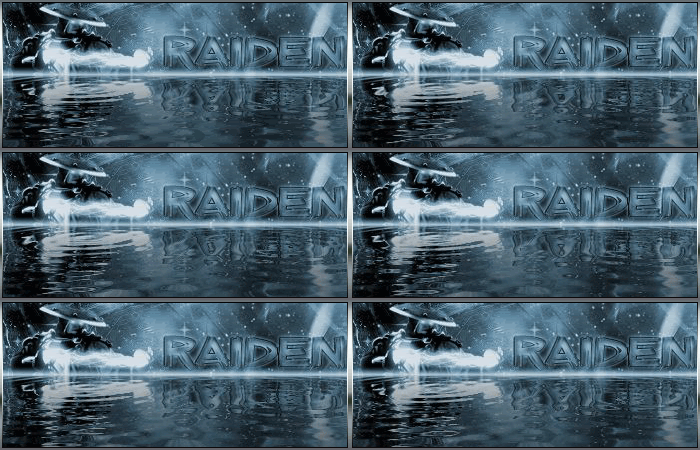


~~~~~~~~~~~~~~~~~~~~~~~~~~~~~~~~~~~~~~~~~~~~~
kay first we need to download: "Sqirlz Water Reflections!"
(This program is approved by TutorialFX & .royalartist and contains NO Spyware / Viruses or anything of that nature.)
http://www.tucows.com/get/382027_143956

____________

Step 01.
After that we need a sig, or image, etc.
If you start with 350x150 the sig must be 350x75


Step 02.
Now start the Sqirtz Water Reflections Program you downloaded.
> File > Open > Your image.
>> Now take the "------" tool and make the selection on the outline of the white part of the image. Like Below.
[The "------" tool is on the left site at your tool bar.]
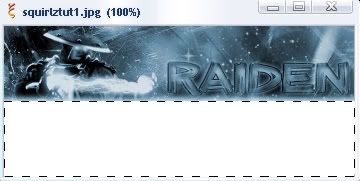


Step 03.
Now, after you've done that, press the "water-button."
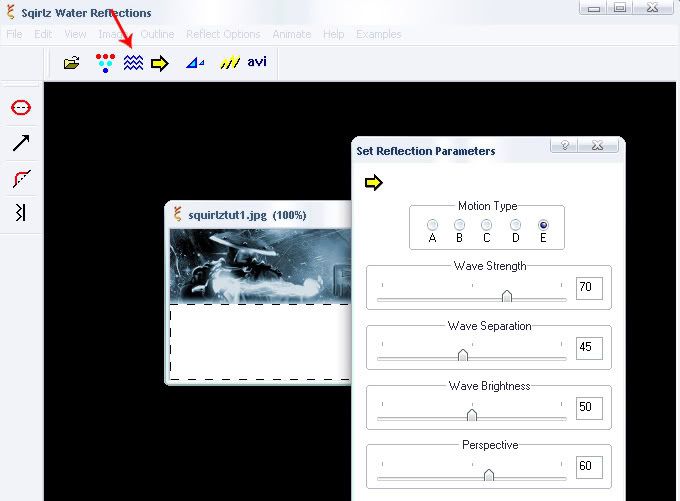


Step 04.
Now, Time to save. Click Animate -> File Sequence -> Save
I save it :
30 Frames
80% .jpg

Now put all of the images into it's very own folder.


Step 05.
Now start Image Ready and go to:
File -> Import -> Folder as Frames -> Your Folder

Note: When you open up your images in Image Ready, the layers WILL be out of order. You are going to have to re-order the layers in the Animation Window.


Step 06.
Set all Other Layers to invisible except Layer 1.
Now dublicate the layer in the animation-window and make the 1st Layer invisible. Make the 2nd Layer invisible.
This you do with all your Layer's!
It's really hard because you can't tween thot Layer's!

If you open the layers in Image Ready, there like this "1,11,2,12,3,13" or somthing like that...you have to bring them like this: " 1,2,3,4,5,6,7,8,9,10 ----"
Look that your Layers in the right Sequence (Pic 1, Pic 2, Pic 3)
If not then improve it. Was the Delay on all Amination Frames the Same?


Step 07.
Now go to File -> Save Optimized As... , to save your image.


Your Outcome should look like the image on the top!

Now your done!

Enjoy!

This post was edited by lowxair on Jan 28 2008 01:14pm
Member
Posts: 6,822
Joined: Aug 22 2007
Gold: 0.70
Jan 28 2008 01:14pm
Quote (lowxair @ Mon, Jan 28 2008, 07:12pm)
Tutorial Properties
Title: Water Effect - Make an image have an animated water reflection.
Category: Imageready
Difficulty: Medium
Author: CJfX [aka .royalartist]

~~~~~~~~~~~~~~~~~~~~~~~~~~~~~~~~~~~~~~~~~~~~~

Outcome:


~~~~~~~~~~~~~~~~~~~~~~~~~~~~~~~~~~~~~~~~~~~~~
kay first we need to download: "Sqirlz Water Reflections!"
(This program is approved by TutorialFX & .royalartist and contains NO Spyware / Viruses or anything of that nature.)
http://www.tucows.com/get/382027_143956

____________

Step 01.
After that we need a sig, or image, etc.
If you start with 350x150 the sig must be 350x75


Step 02.
Now start the Sqirtz Water Reflections Program you downloaded.
> File > Open > Your image.
>> Now take the "------" tool and make the selection on the outline of the white part of the image. Like Below.
[The "------" tool is on the left site at your tool bar.]


Step 03.
Now, after you've done that, press the "water-button."


Step 04.
Now, Time to save. Click Animate -> File Sequence -> Save
I save it :
30 Frames
80% .jpg

Now put all of the images into it's very own folder.


Step 05.
Now start Image Ready and go to:
File -> Import -> Folder as Frames -> Your Folder

Note: When you open up your images in Image Ready, the layers WILL be out of order. You are going to have to re-order the layers in the Animation Window.


Step 06.
Set all Other Layers to invisible except Layer 1.
Now dublicate the layer in the animation-window and make the 1st Layer invisible. Make the 2nd Layer invisible.
This you do with all your Layer's!
It's really hard because you can't tween thot Layer's!

If you open the layers in Image Ready, there like this "1,11,2,12,3,13" or somthing like that...you have to bring them like this: " 1,2,3,4,5,6,7,8,9,10 ----"
Look that your Layers in the right Sequence (Pic 1, Pic 2, Pic 3)
If not then improve it. Was the Delay on all Amination Frames the Same?


Step 07.
Now go to File -> Save Optimized As... , to save your image.


Your Outcome should look like the image on the top!

Now your done!

Enjoy!


aham köszi. Csak ezt valami program nélkül gondoltam ^^
Member
Posts: 45,021
Joined: Jul 28 2005
Gold: 47.25
Jan 28 2008 01:16pm
Quote (Bazsa7 @ Mon, 28 Jan 2008, 20:03)
láttam olyan sigeket, hogy az alsó részén víz van (ami hullámzik) és visszatükröződik a felső rész. Vagy van olyan amikor beleesik egy vízcsepp. Ilyen tutja van valakinek? Vagy valaki leírná, hogy olyat hogyan kell? Nekem nagyon bejön ^^


Erre gondoltal?
Gyorsba csinaltam egyet.
Tutorialt keresek neked, de egy masik progi kell hozza.
Amugy animacio egy sigen kurva ronda imo, legyen az barmi.
Erre mar rajottem a sok sigkeszites soran smile.gif


Ja lol Endre mar postolta, meg ezen amugy is elbasztam a frame rate-et asszem 8D

This post was edited by kabraxis6 on Jan 28 2008 01:16pm
Member
Posts: 6,822
Joined: Aug 22 2007
Gold: 0.70
Jan 28 2008 01:18pm
Quote (kabraxis6 @ Mon, Jan 28 2008, 07:16pm)
Erre gondoltal?
Gyorsba csinaltam egyet.
Tutorialt keresek neked, de egy masik progi kell hozza.
Amugy animacio egy sigen kurva ronda imo, legyen az barmi.
Erre mar rajottem a sok sigkeszites soran smile.gif


Ja lol Endre mar postolta, meg ezen amugy is elbasztam a frame rate-et asszem 8D


de nekem ez nagyon tetszik ^^

ami az elképzelésem lenne: Egy fás sziget vagy rét és a víz alatta. Esetleg ha csöpög bele az eső. Az sztem nagyon menő lenne ^^

Oli te a progit letöltötted?
Member
Posts: 45,021
Joined: Jul 28 2005
Gold: 47.25
Jan 28 2008 01:19pm
Quote (Bazsa7 @ Mon, 28 Jan 2008, 20:18)
de nekem ez nagyon tetszik ^^

ami az elképzelésem lenne: Egy fás sziget vagy rét és a víz alatta. Esetleg ha csöpög bele az eső. Az sztem nagyon menő lenne ^^

Oli te a progit letöltötted?


Animacio ronda mad.gif
Majd te is rajossz biggrin.gif
Igen, megvan a progi RAR fileban, de ott a link ahol le lehet tolteni. Endre postolta ^^
Member
Posts: 6,822
Joined: Aug 22 2007
Gold: 0.70
Jan 28 2008 01:21pm
Quote (kabraxis6 @ Mon, Jan 28 2008, 07:19pm)
Animacio ronda mad.gif
Majd te is rajossz biggrin.gif
Igen, megvan a progi RAR fileban, de ott a link ahol le lehet tolteni. Endre postolta ^^


tudom, de akkor az 100% biztonságos és a photoshoppot se teszi tönkre? ^^
Member
Posts: 45,021
Joined: Jul 28 2005
Gold: 47.25
Jan 28 2008 01:24pm
Quote (Bazsa7 @ Mon, 28 Jan 2008, 20:21)
tudom, de akkor az 100% biztonságos és a photoshoppot se teszi tönkre? ^^


Ket kulon program. Megcsinalod PSben a siget, csak ugy kell, hogy egy uj canvasre teszed, ami nagyobb, es ures az a resze, ahova a vizet akarod. Aztan elmented a siget jpegben, megnyitod a progiban es beteszed a reflectiont.
Aztan elmented GIFkent.
AVI opcio is van, de az mar video, es nem kep ^^
Member
Posts: 45,902
Joined: Oct 8 2006
Gold: 59.00
Jan 28 2008 01:36pm
rate pls
Go Back To Magyar Topic List
Prev19101112131311Next
Closed New Topic New Poll