I followed this tutorial but it seems there is an error. It seems to me (but I am not sure) that every time it copies the the info to the User session variable and then call's it as an associative array it returns a blank.
I have made a php file that individually test's whether I can select, update, and insert to the database and that works.
When using register.php that works, the user is added to the database.
login.php and logout.php also work.
When using settings.php it does not work to change the email. The offending code (I believe):
$email = $user->email;
Seem's like it makes the variable $email a blank.
And same with index.php. When it goes to display a messages "Hello <user>." it just displays "Hello ."
echo $user->username;
The guide I was following:
http://buildinternet.com/2009/12/creating-your-first-php-application-part-1/http://buildinternet.com/2009/12/creating-your-first-php-application-part-2/http://buildinternet.com/2009/12/creating-your-first-php-application-part-3/File structure:
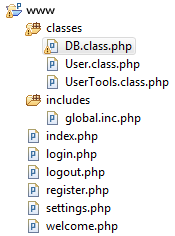
classes/DB.class.php
Code
<?php
//DB.class.php
class DB {
protected $db_name = 'login';
protected $db_user = 'testuser';
protected $db_pass = 'password';
protected $db_host = 'localhost';
//open a connection to the database. Make sure this is called
//on every page that needs to use the database.
public function connect() {
$connection = mysql_connect($this->db_host, $this->db_user, $this->db_pass);
mysql_select_db($this->db_name);
return true;
}
//takes a mysql row set and returns an associative array, where the keys
//in the array are the column names in the row set. If singleRow is set to
//true, then it will return a single row instead of an array of rows.
public function processRowSet($rowSet, $singleRow=false)
{
$resultArray = array();
while($row = mysql_fetch_assoc($rowSet))
{
array_push($resultArray, $row);
}
if($singleRow === true)
return $resultArray[0];
return $resultArray;
}
//Select rows from the database.
//returns a full row or rows from $table using $where as the where clause.
//return value is an associative array with column names as keys.
public function select($table) {
$sql = "SELECT * FROM $table";
$result = mysql_query($sql);
if(mysql_num_rows($result) == 1)
return $this->processRowSet($result, true);
return $this->processRowSet($result);
}
//Updates a current row in the database.
//takes an array of data, where the keys in the array are the column names
//and the values are the data that will be inserted into those columns.
//$table is the name of the table and $where is the sql where clause.
public function update($data, $table, $where) {
foreach ($data as $column => $value) {
$sql = "UPDATE $table SET $column = $value WHERE $where";
mysql_query($sql) or die(mysql_error());
}
return true;
}
//Inserts a new row into the database.
//takes an array of data, where the keys in the array are the column names
//and the values are the data that will be inserted into those columns.
//$table is the name of the table.
public function insert($data, $table) {
$columns = "";
$values = "";
foreach ($data as $column => $value) {
$columns .= ($columns == "") ? "" : ", ";
$columns .= $column;
$values .= ($values == "") ? "" : ", ";
$values .= $value;
}
$sql = "insert into $table ($columns) values ($values)";
mysql_query($sql) or die(mysql_error());
//return the ID of the user in the database.
return mysql_insert_id();
}
}
?>
classes/User.class.php
Code
<?php
//User.class.php
//import
require_once ('DB.class.php');
class User {
public $id;
public $username;
public $hashedPassword;
public $email;
public $joinDate;
//Constructor is called whenever a new object is created.
//Takes an associative array with the DB row as an argument.
function __construct($data) {
$this->id = (isset($data['id'])) ? $data['id'] : "";
$this->username = (isset($data['username'])) ? $data['username'] : "";
$this->hashedPassword = (isset($data['password'])) ? $data['password'] : "";
$this->email = (isset($data['email'])) ? $data['email'] : "";
$this->joinDate = (isset($data['join_date'])) ? $data['join_date'] : "";
}
public function save($isNewUser = false) {
//create a new database object.
$db = new DB();
//if the user is already registered and we're
//just updating their info.
if(!$isNewUser) {
//set the data array
$data = array(
"username" => "'$this->username'",
"password" => "'$this->hashedPassword'",
"email" => "'$this->email'"
);
//update the row in the database
$db->update($data, 'users', 'id = '.$this->id);
}else {
//if the user is being registered for the first time.
$data = array(
"username" => "'$this->username'",
"password" => "'$this->hashedPassword'",
"email" => "'$this->email'",
"join_date" => "'".date("Y-m-d H:i:s",time())."'"
);
$this->id = $db->insert($data, 'users');
$this->joinDate = time();
}
return true;
}
}
?>
classes/UserTools.class.inc
Code
<?php
//UserTools.class.php
//import
require_once ('User.class.php');
require_once ('DB.class.php');
class UserTools {
//Log the user in. First checks to see if the
//username and password match a row in the database.
//If it is successful, set the session variables
//and store the user object within.
public function login($username, $password)
{
$hashedPassword = md5($password);
$result = mysql_query("SELECT * FROM users WHERE username = '$username' AND password = '$hashedPassword'");
if(mysql_num_rows($result) == 1)
{
$_SESSION["user"] = serialize(new User(mysql_fetch_assoc($result)));
$_SESSION["login_time"] = time();
$_SESSION["logged_in"] = 1;
return true;
}else{
return false;
}
}
//Log the user out. Destroy the session variables.
public function logout() {
unset($_SESSION['user']);
unset($_SESSION['login_time']);
unset($_SESSION['logged_in']);
session_destroy();
}
//Check to see if a username exists.
//This is called during registration to make sure all user names are unique.
public function checkUsernameExists($username) {
$result = mysql_query("select id from users where username='$username'");
if(mysql_num_rows($result) == 0)
{
return false;
}else{
return true;
}
}
//get a user
//returns a User object. Takes the users id as an input
public function get($id)
{
$db = new DB();
$result = $db->select('users', "id = $id");
return new User($result);
}
}
?>
includes/global.inc.php
Code
<?php
//global.inc.php
//import
require_once ('classes/User.class.php');
require_once ('classes/UserTools.class.php');
require_once ('classes/DB.class.php');
//connect to the database
$db = new DB();
$db->connect();
//initialize UserTools object
$userTools = new UserTools();
//start the session
session_start();
//refresh session variables if logged in
if(isset($_SESSION['logged_in'])) {
$user = unserialize($_SESSION['user']);
$_SESSION['user'] = serialize($userTools->get($user->id));
}
?>
register.php
Code
<?php
//register.php
require_once ('includes/global.inc.php');
//initialize php variables used in the form
$username = "";
$password = "";
$password_confirm = "";
$email = "";
$error = "";
//check to see that the form has been submitted
if(isset($_POST['submit-form'])) {
//retrieve the $_POST variables
$username = $_POST['username'];
$password = $_POST['password'];
$password_confirm = $_POST['password-confirm'];
$email = $_POST['email'];
//initialize variables for form validation
$success = true;
$userTools = new UserTools();
//validate that the form was filled out correctly
//check to see if user name already exists
if($userTools->checkUsernameExists($username))
{
$error .= "That username is already taken.</br> \n\r";
$success = false;
}
//check to see if passwords match
if($password != $password_confirm) {
$error .= "Passwords do not match.</br> \n\r";
$success = false;
}
if($success)
{
//prep the data for saving in a new user object
$data['username'] = $username;
$data['password'] = md5($password); //encrypt the password for storage
$data['email'] = $email;
//create the new user object
$newUser = new User($data);
//save the new user to the database
$newUser->save(true);
//log them in
$userTools->login($username, $password);
//redirect them to a welcome page
header("Location: welcome.php");
}
}
//If the form wasn't submitted, or didn't validate
//then we show the registration form again
?>
<html>
<head>
<title>Registration</title>
</head>
<body>
<?php echo ($error != "") ? $error : ""; ?>
<form action="register.php" method="post">
Username: <input type="text" value="<?php echo $username; ?>" name="username" /></br>
Password: <input type="password" value="<?php echo $password; ?>" name="password" /></br>
Password (confirm): <input type="password" value="<?php echo $password_confirm; ?>" name="password-confirm" /></br>
E-Mail: <input type="text" value="<?php echo $email; ?>" name="email" /></br>
<input type="submit" value="Register" name="submit-form" />
</form>
</body>
</html>
This post was edited by ROM on Apr 11 2016 09:15am