Your where clause is what makes it relative to restaurant name. Only records where Restaurant.name = 'Mcdonalds' will be counted.
Here's simple visual example of how grouping works:
Code
Select ID,
SUM(VALUES)
FROM myTable
GROUP BY ID

In your case you want to count occurrences of restaurants named Mcdonalds in each state. The group by clause identifies how you want to aggregate your result set. You are correct in using state as your group by since you want to know the count for each state.
Quote (SAJ @ Mar 24 2015 06:50pm)
Do i need to change the WHERE conditions?
Code
WHERE
Address.restaurantID = Restaurants.ID
that still gives me a weird answer. =(
Yes, you need Address.restaurantID = Restaurants.ID in your where clause too. Without it you what's going to happen is the database engine is going to join every record in Address to every record in Restaurant where Restaurant.Name = 'Mcdonalds' since it was told to select from both tables without any instruction on how to link the two together.
ex:
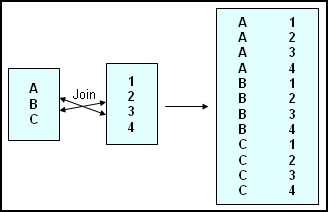
By adding Address.restaurantID = Restaurants.ID to your where clause, records are only joined together when the RestaurantID in Address is equivalent to the ID in Restaurant.
The only other problem I see from your other query is that you didnt't have a comma between your column names and table names. I don't know what the database engine you're using, but usually when you do this what happens is that the first value is selected and the second value is treated as a label. So in your case, I would imagine the data set you were returning was showing states with a heading of count(state).
In theory this query should give you what you wanted.
Code
SELECT
State,
count(state)
FROM
Address,
Restaurants
WHERE
Address.restaurantID = Restaurants.ID
AND Restaurants.name = "Mcdonalds"
GROUP BY
state
This post was edited by choombawoomba on Mar 24 2015 06:23pm