d2jsp
Log InRegister
d2jsp Forums > d2jsp > General Help > How Upload Pics
Add Reply New Topic
Banned
Posts: 2,270
Joined: Aug 13 2025
Gold: 0.00
Warn: 10%
Nov 7 2025 06:54am
Pls lmk

This post was edited by Herca on Nov 7 2025 06:54am
Member
Posts: 73,790
Joined: Jan 13 2018
Gold: 261,275.69
Nov 7 2025 06:58am
hi,

below i post a topic which explains all

https://forums.d2jsp.org/topic.php?t=82224869&f=34

happy weekend
Banned
Posts: 2,270
Joined: Aug 13 2025
Gold: 0.00
Warn: 10%
Nov 8 2025 02:35am
hi,

below i post a topic which explains all

https://forums.d2jsp.org/topic.php?t=82224869&f=34

happy weekend


Not work i need some for all with phone faster pictures


Any other site ?
Trade Moderator
Posts: 9,312
Joined: Oct 2 2021
Gold: 9,563.66
Trader: Mediator
Nov 8 2025 05:55am
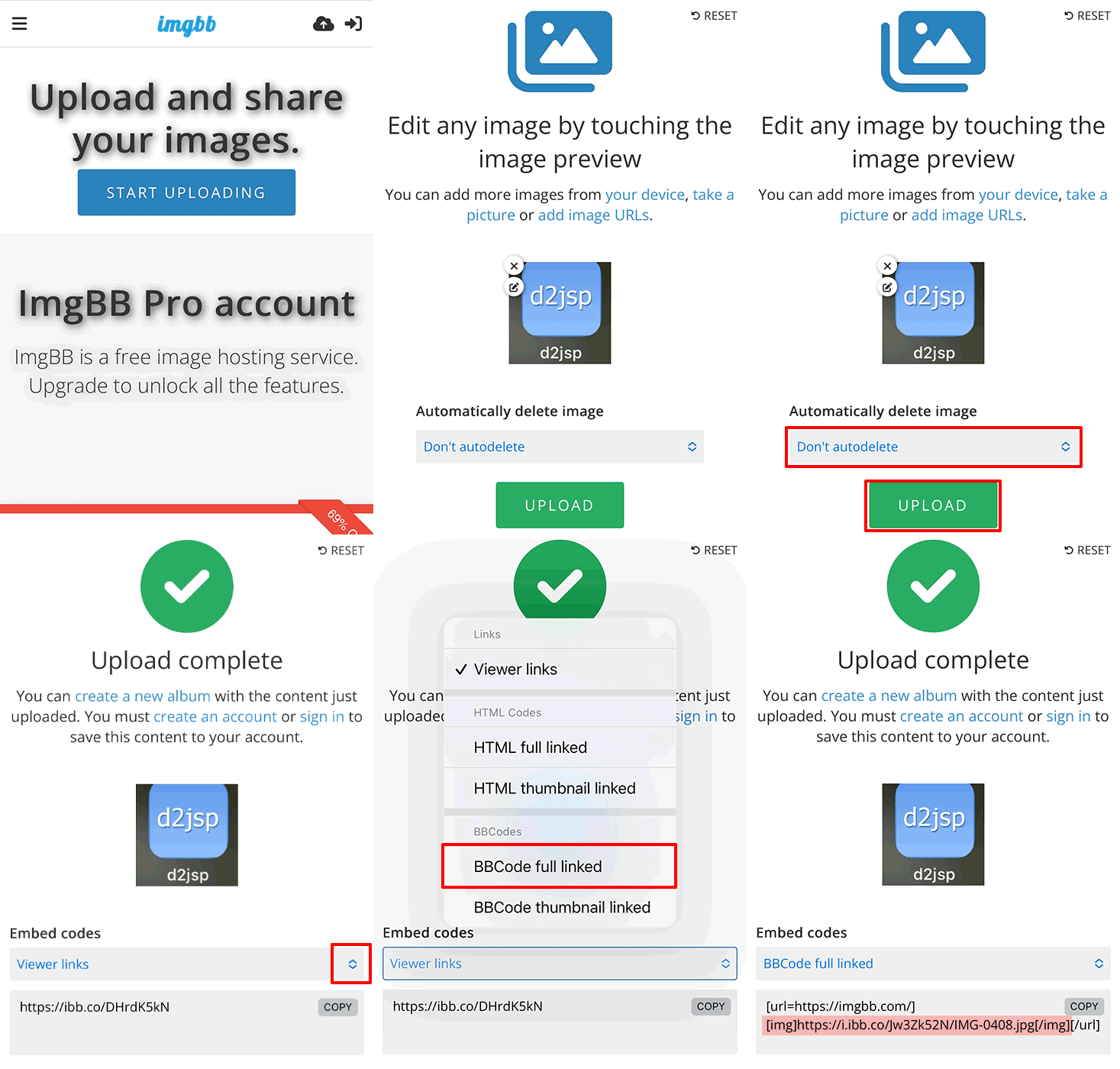
You might want to check out imgbb if you don't want to use imgur. Typically it's a bit easier to navigate on smartphones.

Visit the website, click on 'start uploading'. Select the image you wish to upload.
Then, make sure 'Don't autodelete' is selected (otherwise your image get's removed after the set time), and click on 'upload'.
Click the arrow next to 'viewer links' to open the drop down menu and select 'BBCode full linked'.
The site will provide you with a code at the bottom. You can copy and paste it to d2jsp and remove everything left and right of the IMG tags.

This would leave you with a direct image link that can be embedded on d2jsp.
Code
[img]https://i.ibb.co/Jw3Zk52N/IMG-0408.jpg[/img]


Alternatively, there is a site feature that lets you upload images from your phone to d2jsp directly if you have customer perks or donor forum access: https://forums.d2jsp.org/topic.php?t=83903674

This post was edited by derAmigo on Nov 8 2025 05:58am
Banned
Posts: 2,270
Joined: Aug 13 2025
Gold: 0.00
Warn: 10%
Nov 8 2025 06:00am
You might want to check out imgbb if you don't want to use imgur. Typically it's a bit easier to navigate on smartphones.

Visit the website, click on 'start uploading'. Select the image you wish to upload.
Then, make sure 'Don't autodelete' is selected (otherwise your image get's removed after the set time), and click on 'upload'.
Click the arrow next to 'viewer links' to open the drop down menu and select 'BBCode full linked'.
The site will provide you with a code at the bottom. You can copy and paste it to d2jsp and remove everything left and right of the IMG tags.

This would leave you with a direct image link that can be embedded on d2jsp.
Code
https://i.ibb.co/Jw3Zk52N/IMG-0408.jpg


https://i.ibb.co/ZpKS4Jvw/mobile.gif

Alternatively, there is a site feature that lets you upload images from your phone to d2jsp directly if you have customer perks or donor forum access: https://forums.d2jsp.org/topic.php?t=83903674


Same i try
Member
Posts: 18,999
Joined: May 7 2024
Gold: 60.00
Warn: 20%
Nov 8 2025 09:59am
Same i try


use link ending with file extension
Member
Posts: 9,918
Joined: Mar 23 2008
Gold: 10.00
Nov 8 2025 12:39pm
use link ending with file extension


Yea this. You can right click and I believe you would go to the inspect feature and you can get the .jpg that way. imgur used to make it easier to get the direct link.
Go Back To General Help Topic List
Add Reply New Topic