d2jsp
Log InRegister
d2jsp Forums > Off-Topic > Computers & IT > Computer Building > It's That Time. Current Pc Not Cutting It Anymore
Prev123Next
Add Reply New Topic New Poll
Member
Posts: 13,214
Joined: Nov 11 2006
Gold: 120.01
Jul 5 2022 05:10pm
Quote (birrdd123 @ Jul 4 2022 07:32pm)
The i7 would pick up some slack in non gaming apps for sure, and is slightly faster for games still, so it's not a waste if you're OK at the price.
Id think that mobo will last until your cpu/lga 1700 is irrelevant, so not much more to invest in there.

That mobo should be more than OK until cpu/lga 1700 is irrelevant.

If it were my build focused on gaming and I had an extra 500, I'd probably go with another monitor(if you don't have 2 already), a faster gpu (3080ti/3090, though you definitely start to lose price/performance value after the 3080), more storage (2nd m2 or larger one), or something that can go to your next build like an open loop liquid cooling setup.

But before all that, If you're planning to purchase in 1-2mo still, and if the rumors of 4000 series gpu are true, you may be able to grab a new release 4080/4090 (if that's the name they go with) at a higher price but even better price/performance.


currently have https://www.newegg.com/powercolor-radeon-r9-290-axr9-290-4gbd5-tdhe-oc/p/N82E16814131569 for a gpu, finally in a position to upgrade. Apparently at a bad time in between new hardware being released. happy to hold off on buying a gpu for the 4000 series.
just 1 question before I start buying parts.

would my old card be compatible to hold me over until then? or just let new build sit for awhile?
If that's the case, would I be better off waiting to buy all components? or just have a 90% finished build sitting for potentially months (maybe losing value/ becoming more obsolete)?
Member
Posts: 1,695
Joined: Nov 25 2012
Gold: 10,069.50
Jul 5 2022 06:57pm
Yup the old card will work until you grab a new one. Also, I got a Newegg email earlier today with the i7 12700k on sale for $350

Also, grabbing a 3080 wouldn't be the worst thing in the world. I'd likely wait to see if rumors are true, but even if they are, who knows if there will be supply issues/backorder and the 3080 will still run everything great for a while. I'm not in a position where I want to play a game my card cannot handle, but if I were, I'd be pretty tempted to grab a 3000 series simply because they're finally close to msrp.

This post was edited by birrdd123 on Jul 5 2022 07:01pm
Member
Posts: 9,066
Joined: Jun 6 2009
Gold: 0.00
Jul 6 2022 04:15am
Quote (TraXile @ 1 Jul 2022 18:00)
Budget:2000-2500
More specific use (what games, what programs): probably most demanding game would be rust.
Planned time until purchase: 1-2 months, sooner if deals are around
Do you need an Operating System?: yes
Do you have any specific preferred components?: would prefer to have at least a 3080
Do you need a sound or wireless card?: not 100% on sound card, no need for wireless
Do you want stock cooling or do you plan on overclocking?: planning to rob my corsair all in 1 water cool kit from current build, unless compatibility issues.
Do you need a monitor? mouse? keyboard?: Will need new keyboard/mouse, but if it puts me over budget those can wait. have a decent setup atm.
Zip code/location? (Shipping costs): 97266

messing around on newegg currently myself, will post builds with my bumps/posts that people can critique, any tips/help much appreciated.

thanks!
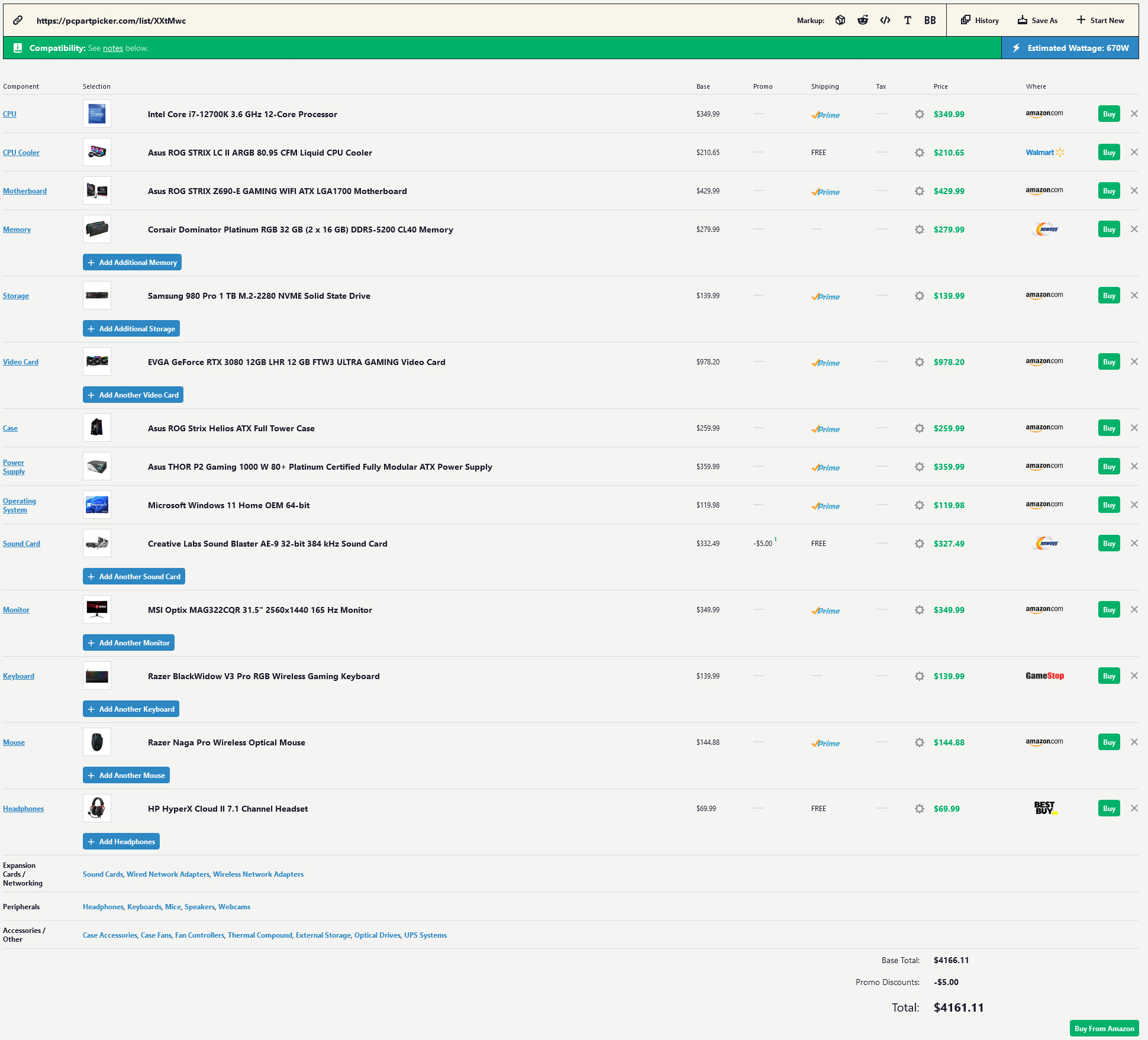


https://pcpartpicker.com/list/XXtMwc
Picture Parts List of 2022's Common Recommended Parts / Build.
Build Fits your budget if you remove Windows , Mouse, Keyboard, Headset , Sound Card , Monitor.

34% Performance Boost Compared to your list


MSI 32"" Screen - Full HD RGB LED Non-Glare Super Narrow Bezel 1ms HDR Ready 2560 x 1440 165Hz Refresh Rate Free Sync Height Adjustable Curved Gaming Monitor (Optix MAG322CQR), Black

$299.99 , This Monitor is a must have for rust!! Especially if your in the tunnels underground & Ride the Train, Instead of 80% black screen , and not being able to see the NPC's even with a flashlight...
You will now be able to see NPCS clearly without a flash light, and only 10% of your screen will be black, while that other 70% of 80% is going to be a Nice Dark/Dirt/ Grassy Stone Ground !!!
Bonus: Easier to see / detect enemy players, as they won't be pixelated blending in with the backgrounds of things. ( They will be almost HD 3D ).
Also: if you game during the day at home, that Anti-Glare is a huge bonus.


Intel is the new " Best Bang for the buck " Also A " Must Have " for windows 11 due to the new TPM compatibility issues causing performance issues with AMD currently.
Featuring not only more raw performance for single and multicore, but also newer Generation features to enhance your other parts to function faster/ stable / safer as well.
Another Bonus is the reduced heating :D

Graphics Card
Avoid Zotac / Gigabyte Brands <- Not only do they use cheap parts, poor cooling, and cheap Thermal Pads. They are normally underclocked to a slower performance.
Back in the old days it was only a 4% performance difference on average, now we are talking 10% loss + Super Heat & early Death.

Examples of good Cards MSi = ok / EVGA = Best Factory CLock rate & Cooling parts.
RTX 3080 " 10GB" - Rust will play on low/mid settings
RTX 3080 "12GB" - Rust will play on high/ very high settings
RTX 3080TI 12gb - Rust will play on max settings
Motherboards
Make sure its a 590Z or 690Z motherboard

Wireless + Bluetooth come built-in for an extra 60$ , which can be nice if you want surround sound, connect to TV , and or even share videos/pics or make phone calls with a cellphone wirelessly.
They also include a decently good Onboard Sound Chip, This normally Provides HD Boosted 6x 3.5 jacks in the rear, and then 2x 3.5 jacks on the front panel of your pc.
Also can help Enhance USB Audio.

Sound Cards Creative Sound Blast = Best
Recorders/streamers - May want to get confusing Virtual Audio Software to split the audio for every app/program/game.
Sound Cards are able to do the same features, and less confusing.
CPU Cooling Normally for every Generation of CPU, the water cooling kits have different power connectors.
Also less confusing to get a newer one that has newer connector cables that plug directly into a Fan-Hub that comes with most new computer cases.
Provides Better Fan Controls and compatibility for software. Ideally a 3 Fan top Radiator is best, that way if 1 fan goes out, 2 still work, and the automated software will detect heat temp and automatically underclock based on settings.
Giving you a chance to fix the issue.

Storage
No more regular hard drives
SSD on a super budget.25 bucks
M2 Stick on a budget. 50 bucks
M2 stick - Samsung pro, if not on a budget. Average 80-200$

Note: Youtube - Look for Promo Codes, you can probably get the entire build for closer to $2800 without sound card. I've seen a lot of Combo / % / - $ off lately.

This post was edited by conetopia on Jul 6 2022 04:22am
Member
Posts: 13,214
Joined: Nov 11 2006
Gold: 120.01
Jul 6 2022 06:17pm
Quote (conetopia @ Jul 6 2022 03:15am)
https://i.gyazo.com/be87e6b7f614006cf7a89aebaf72a267.jpg

https://pcpartpicker.com/list/XXtMwc
Picture Parts List of 2022's Common Recommended Parts / Build.
Build Fits your budget if you remove Windows , Mouse, Keyboard, Headset , Sound Card , Monitor.

34% Performance Boost Compared to your list


MSI 32"" Screen - Full HD RGB LED Non-Glare Super Narrow Bezel 1ms HDR Ready 2560 x 1440 165Hz Refresh Rate Free Sync Height Adjustable Curved Gaming Monitor (Optix MAG322CQR), Black

$299.99 , This Monitor is a must have for rust!! Especially if your in the tunnels underground & Ride the Train, Instead of 80% black screen , and not being able to see the NPC's even with a flashlight...
You will now be able to see NPCS clearly without a flash light, and only 10% of your screen will be black, while that other 70% of 80% is going to be a Nice Dark/Dirt/ Grassy Stone Ground !!!
Bonus: Easier to see / detect enemy players, as they won't be pixelated blending in with the backgrounds of things. ( They will be almost HD 3D ).
Also: if you game during the day at home, that Anti-Glare is a huge bonus.


Intel is the new " Best Bang for the buck " Also A " Must Have " for windows 11 due to the new TPM compatibility issues causing performance issues with AMD currently.
Featuring not only more raw performance for single and multicore, but also newer Generation features to enhance your other parts to function faster/ stable / safer as well.
Another Bonus is the reduced heating :D

Graphics Card
Avoid Zotac / Gigabyte Brands <- Not only do they use cheap parts, poor cooling, and cheap Thermal Pads. They are normally underclocked to a slower performance.
Back in the old days it was only a 4% performance difference on average, now we are talking 10% loss + Super Heat & early Death.

Examples of good Cards MSi = ok / EVGA = Best Factory CLock rate & Cooling parts.
RTX 3080 " 10GB" - Rust will play on low/mid settings
RTX 3080 "12GB" - Rust will play on high/ very high settings
RTX 3080TI 12gb - Rust will play on max settings
Motherboards
Make sure its a 590Z or 690Z motherboard

Wireless + Bluetooth come built-in for an extra 60$ , which can be nice if you want surround sound, connect to TV , and or even share videos/pics or make phone calls with a cellphone wirelessly.
They also include a decently good Onboard Sound Chip, This normally Provides HD Boosted 6x 3.5 jacks in the rear, and then 2x 3.5 jacks on the front panel of your pc.
Also can help Enhance USB Audio.

Sound Cards Creative Sound Blast = Best
Recorders/streamers - May want to get confusing Virtual Audio Software to split the audio for every app/program/game.
Sound Cards are able to do the same features, and less confusing.
CPU Cooling Normally for every Generation of CPU, the water cooling kits have different power connectors.
Also less confusing to get a newer one that has newer connector cables that plug directly into a Fan-Hub that comes with most new computer cases.
Provides Better Fan Controls and compatibility for software. Ideally a 3 Fan top Radiator is best, that way if 1 fan goes out, 2 still work, and the automated software will detect heat temp and automatically underclock based on settings.
Giving you a chance to fix the issue.

Storage
No more regular hard drives
SSD on a super budget.25 bucks
M2 Stick on a budget. 50 bucks
M2 stick - Samsung pro, if not on a budget. Average 80-200$

Note: Youtube - Look for Promo Codes, you can probably get the entire build for closer to $2800 without sound card. I've seen a lot of Combo / % / - $ off lately.


https://pcpartpicker.com/list/Xj8nd9

How's this look?
Want to hit that 2500 mark, but its not 100% necessary, more of a semi hard line I put on myself.
The days leading up to purchase, which will be coming soon will decide if I hold on to current GPU and wait out the 4000 series. but swapped card out for 3080 ti, if it lets me play on ultra setting, I want it :blink:
I will end up getting sound card eventually, but for the time I'll go with onboard and treat the card as an extra once I recover from the build cost.
also swapped out power supply for one I had in other build, is there a reason to jump from gold to plat? Just wondering if there is a huge difference? mostly cause that's a $200 jump, obviously not for no reason, but just curious what that reason is :wacko:

Any hints on channels/streams/videos to watch for promo codes?
Would love to bring cost down just a bit, 2500 was my cutoff point, but with 1k into a video card I'm okay breaking it by a little. The closer the better though.

Thanks for the info!


https://www.microcenter.com/product/627518/dell-s2721dgf-27-2k-wqhd-(2560-x-1440)-165hz-wide-screen-gaming-monitor
Current monitor I have. picked up from best buy outlet store near Seattle for $150 when I was near there for work. was considering getting a 2nd
anyways any clue on how that would compare? Really hate the look of not matching monitors XD


Quote (birrdd123 @ Jul 5 2022 05:57pm)
Yup the old card will work until you grab a new one. Also, I got a Newegg email earlier today with the i7 12700k on sale for $350

Also, grabbing a 3080 wouldn't be the worst thing in the world. I'd likely wait to see if rumors are true, but even if they are, who knows if there will be supply issues/backorder and the 3080 will still run everything great for a while. I'm not in a position where I want to play a game my card cannot handle, but if I were, I'd be pretty tempted to grab a 3000 series simply because they're finally close to msrp.


Good to know! thanks for the info!
Member
Posts: 1,695
Joined: Nov 25 2012
Gold: 10,069.50
Jul 6 2022 06:57pm
Sure thing. GL with the build! Also, the pricier mobo/ram will have VERY little to no impact on most apps and gaming, if that helps at all.
Member
Posts: 17,501
Joined: Aug 15 2015
Gold: 3,900.01
Member
Posts: 13,214
Joined: Nov 11 2006
Gold: 120.01
Jul 6 2022 09:14pm
Quote (MadMardi @ Jul 6 2022 07:56pm)


holy shit that cooler size lol.

will factor this in, appreciate it!
Member
Posts: 9,066
Joined: Jun 6 2009
Gold: 0.00
Jul 7 2022 10:32am
Quote (TraXile @ 6 Jul 2022 19:17)
https://pcpartpicker.com/list/Xj8nd9

How's this look?
Want to hit that 2500 mark, but its not 100% necessary, more of a semi hard line I put on myself.
The days leading up to purchase, which will be coming soon will decide if I hold on to current GPU and wait out the 4000 series. but swapped card out for 3080 ti, if it lets me play on ultra setting, I want it :blink:
I will end up getting sound card eventually, but for the time I'll go with onboard and treat the card as an extra once I recover from the build cost.
also swapped out power supply for one I had in other build, is there a reason to jump from gold to plat? Just wondering if there is a huge difference? mostly cause that's a $200 jump, obviously not for no reason, but just curious what that reason is :wacko:

Any hints on channels/streams/videos to watch for promo codes?
Would love to bring cost down just a bit, 2500 was my cutoff point, but with 1k into a video card I'm okay breaking it by a little. The closer the better though.

Thanks for the info!
https://www.microcenter.com/product/627518/dell-s2721dgf-27-2k-wqhd-(2560-x-1440)-165hz-wide-screen-gaming-monitor
Current monitor I have. picked up from best buy outlet store near Seattle for $150 when I was near there for work. was considering getting a 2nd
anyways any clue on how that would compare? Really hate the look of not matching monitors XD

Good to know! thanks for the info!


Yeah the RTX 4000's are supposed to be similar in performance, but the technology will be fairly more updated.
Examples would be electric Watts lowered / Temp Reduced.
Prices will be similar

Wouldn't hurt to make the complete build , and get yourself a nice desk/chair to meet your budget, use an old video card, and save for another later.
With the build i sent , you will get a FPS boost with any older card roughly by 8% ( so something to think about ).

Power supply Ratings 650 Watts Examples
80Plus 25$, Bronze 50$ , silver 75$ , gold 100$ , platinum 150$ , titanium 200$
Expensive builds > Run more often > Run hotter > Efficiency. ( Electricity Burns / gets Wasted )
If : Your computer uses 500 watts, you won't be buying a 80Plus Power supply.
You would be getting at least a Bronze Minimum.
Your running it at max capacity , this can cause small surges of burst of electricity , which causes the Capacitors of your Motherboard and video card ect to run hot, which makes the life shorter.

Bonus: The better the power supply, the more stable of security it will be, and less heat created.


- EVGA- Power supplies in my opinion are not that great. They generate a ton of heat, and the cables connectors are cheap.
- Corsair - Normally really good - But they have some Fan issues.
Rosewill on a budget is fine
GameMax also on a budget - Good RGB colors
Cool Master Normally good products
MSI also decent
Asus has been very good overall. - But a little on the higher price for that great Quality


* As far as monitors Go *
Your Monitor On a 1-10 Scale : is about a 5.
MSI Optix MAG322CQR 32 : is about a 8.5
There are better options out there, but $300 vs $1800+ is a huge gap.

Dell 1000:1 Contrast Ratio - Black/Darker screen - Bad for video games , Decent for Office work, Terrible for Visual art
MSI 3000:1 Contrast Ratio - Less Black / Brither - Excellent for video games, Great for Office work. decent for visual art

--- Make sure your desk is wide enough if using 2 monitors , and or get aftermarket stands.
Sometimes its better to get an extra wide screen, and then have the computer just split the screen in half.


Member
Posts: 32,891
Joined: Mar 9 2006
Gold: 26,489.59
Jul 7 2022 11:31am
Personally I’d wait for 4000 series cards
Member
Posts: 61
Joined: Jun 7 2022
Gold: 0.00
Jul 12 2022 08:45pm
may i see other people opinion too?
Go Back To Computer Building Topic List
Prev123Next
Add Reply New Topic New Poll