How to post using the new trade system for trade section's.First of all you have 5 new tab's and a few new type of topic creation button's added to the top of your screen these tab's and button's are :

FT and ISO are shortened terms used to stand for :
For Trade - ( FT )
In Search Of - ( ISO )
Here are the symbol's corresponding to the topic types
Here's a breif description of each tab :
All topicsThis tab will display all the types of topic's made.
FT 's - For TradeThis will display all the topic's made by user's trading their item(s) for your Forum Gold.
ISO's - In Search OfThis will display all the topic's made by user's trading their Forum Gold for your item(s).
Service'sYou can offer your personal service's to people using this option. Remember you still have My Event's there so you could always link them to your event.
Price Check'sThis will display all topic's where user's are requesting to know the price of their item(s).
How do i use the new system ?FT topic's - State what you offer in the topic title and put specifics in the description.
ISO topic's - State what you're looking for in the topic title and put specific's in the description.
Service topic's - State your service type in the topic title and put specific's in the description.
Price Check topic - State what you want price checked in the topic title and put specific's in the description.
Note : If you have a set price that you would like to buy or sell or do a service at , post it !
Note : Remember your manner's when asking for a Price Check as people don't have to take their time to give you a price !
Here's what it will look like when you want to create any type of topic using the new system.
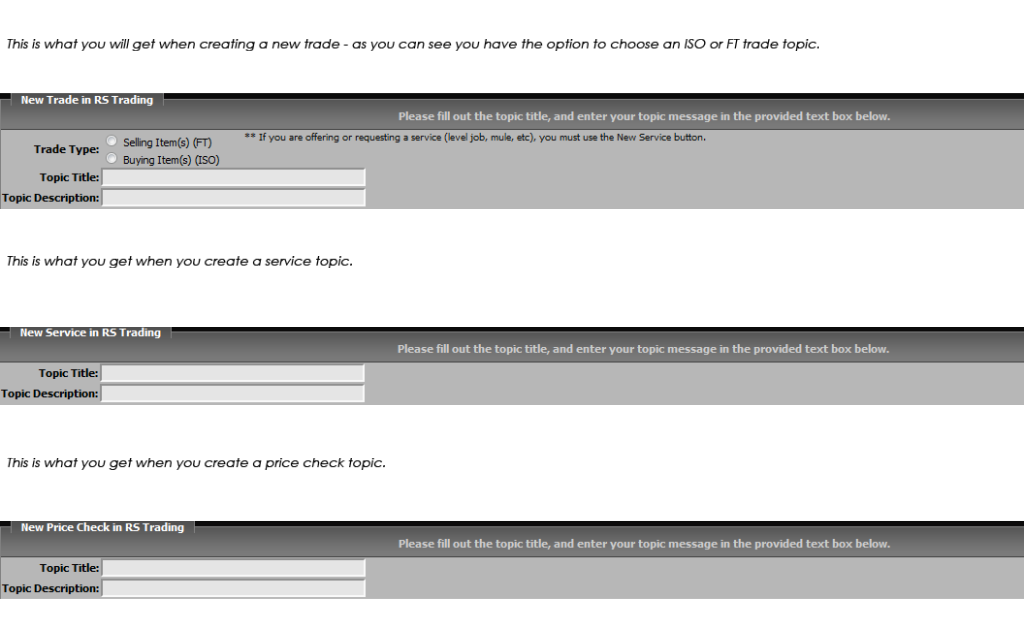
So if you didn't know how to use the system , i hope you do now !
If you don't and you have any questions , feel free to Message me.
Regard's - gingernuts1 ( Corey )
This post was edited by gingernuts1 on Mar 24 2011 06:54pm